- ASO
- App Store
- iOS
App Store subtitle: 30 characters, rules and examples
App Store subtitle guide: the 30-character limit, what Apple rejects, how it affects search ranking, and what the top 100 US apps do with theirs.
AppRanker team14 min read
On this page
The App Store subtitle is the short line under your app's name. It shows on your product page, in search results and in some Apple Ads placements, and Apple counts it when matching your app to a search. You get 30 characters. Most developers fill it once, at launch, with a slogan, and never look at it again.
This guide covers the rules for the subtitle (the limit, what gets it rejected, when you can change it), how it fits with the name and keyword field in App Store search, and a step-by-step way to write one. It also looks at what the top 100 US iPhone apps actually put in theirs: we read the subtitles of the top 50 free and top 50 paid apps on November 16, 2026, and the numbers are below. There is a small script to check a draft before you submit it.
Key takeaways
- The App Store subtitle can be up to 30 characters. Apple lists it, with the name, keyword field and primary category, as a text relevance factor in search.
- You can only change it when you submit a new version. It cannot be A/B tested with product page optimization, and custom product pages share it.
- Guideline 2.3.7 bans prices, other apps' names and unverifiable claims such as "#1" in subtitles.
- In our sample of the top 100 US apps, 96 had a subtitle, the average was 26.4 characters, and 29 repeated a word already in the app name, which wastes space for search.
- Write it as a plain phrase that names what the app does, using search words that are not already in your name, then measure the change in App Store Connect.
What the App Store subtitle is and where it appears
Apple introduced the subtitle in 2017, at the same time it cut app names to 30 characters. Its product page guidance describes it this way: "Your app's subtitle is intended to summarize your app in a concise phrase. Consider using this, rather than your app's name, to explain the value of your app in greater detail." It adds that a subtitle "appears below your app's name throughout the App Store."
In practice, that means four places:
- Your product page, directly under the name, above the Get button.
- Search results. Apple's search page says "Elements of your App Store product page that appear in search results include your app name, subtitle, screenshots, and more."
- Browse surfaces such as charts and category lists, where the subtitle sits under the name.
- Apple Ads. Apple's ad placement help says Today tab ads "feature your app name, icon, and subtitle," and that the subtitle must be approved for advertising before an ad can run.
You set it in App Store Connect under App Information, alongside the name. Both are localizable: each language you add to your listing has its own name and subtitle, which matters if you rank in more than one country. Our App Store localization guide covers which languages each storefront indexes.
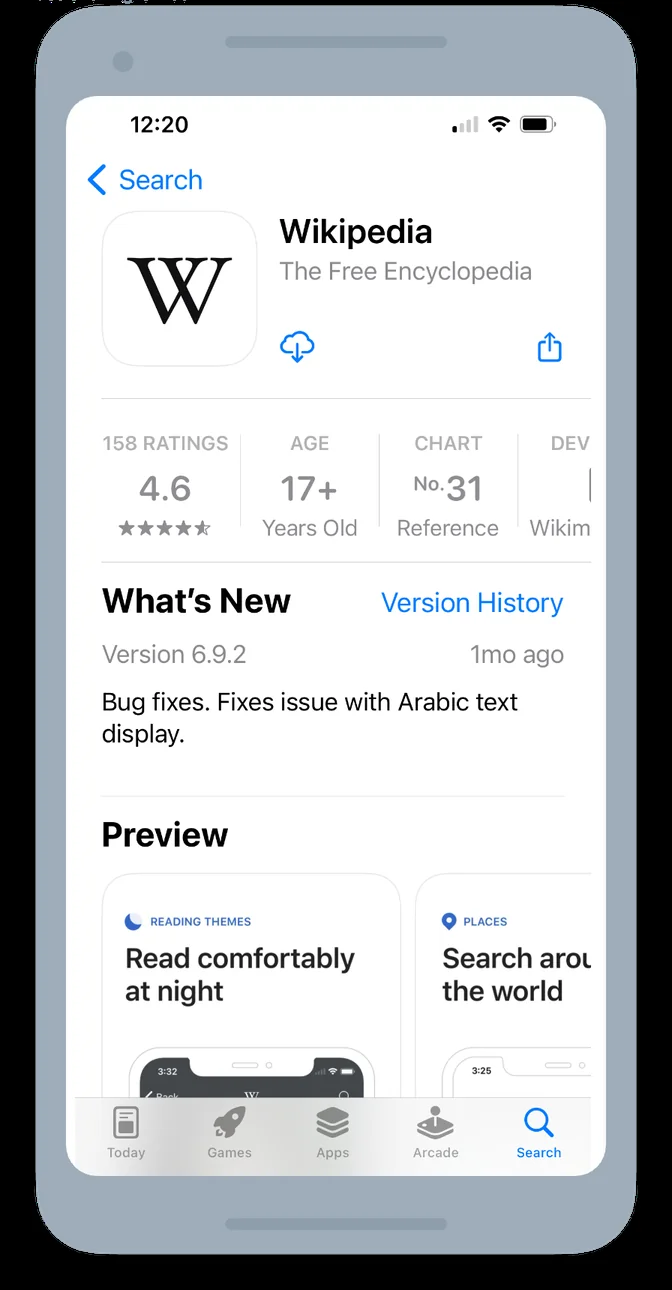
The subtitle sits between the name and everything else on the page. Image: RWambua-WMF, Wikimedia Commons, CC BY-SA 4.0
App Store subtitle rules: limit, content and timing
The 30-character limit
App Store Connect's app information reference defines the subtitle as "A summary of your app that appears under your app's name on your App Store product page. This can't be longer than 30 characters." Spaces and punctuation count. The name has the same limit, so name and subtitle together give you 60 characters of indexed text, plus the 100-byte keyword field.
What Apple rejects
App Review Guideline 2.3.7 is the rule that applies:
"App subtitles are a great way to provide additional context for your app; they must follow our standard metadata rules and should not include inappropriate content, reference other apps, or make unverifiable product claims."
The same guideline says metadata such as names and subtitles "should not include prices, terms, or descriptions that are not specific to the metadata type," and warns against packing metadata with "trademarked terms, popular app names, pricing information, or other irrelevant phrases." Guideline 2.3.8 adds one more: terms like "For Kids" and "For Children" are reserved for apps in the Kids category, and apps outside it "cannot include any terms in app name, subtitle, icon, screenshots or description that imply the main audience for the app is children."
So in a subtitle, avoid:
- Prices, discounts and sale wording ("$4.99", "50% off", "Black Friday deal").
- The names of other apps or brands you do not own.
- Claims you cannot prove: "#1", "best", "most accurate".
- "For kids" and similar wording unless you are in the Kids category.
- Generic filler. Apple's own example of what to avoid is "world's best app."
When you can change it
The subtitle is not live metadata. Apple says "You can update your subtitle when submitting a new version of your app," so a new subtitle ships with your next approved version, not on its own. That is different from promotional text, which you can change any day but which does not affect search. Our guide to the App Store description covers both of those fields.
Two related limits matter for testing. Product page optimization tests icons, screenshots and previews only, so you cannot A/B test a subtitle. And custom product pages share the subtitle of your default page; only screenshots, previews, promotional text, keywords and the deep link change per page.
Does the subtitle affect App Store search ranking?
Yes. Apple's search page says results are based on "text relevance (matches for your app's title, subtitle, keywords, and primary category), as well as user behavior (downloads, ratings and reviews, and more)." The subtitle is one of only four text fields Apple names, which is why it is worth more thought than a slogan.
It works with the other three, not on its own:
- Name (30 characters). Usually your brand plus the most important phrase. Our guide on how to name an app covers that split.
- Subtitle (30 characters). The next most important phrase, in words people search for, and readable as a sentence.
- Keyword field (100 bytes). Everything else, as single words separated by commas. Apple tells you not to repeat "any words included in your app name, subtitle, or category."
- Primary category. Also indexed, so a word like "Productivity" does not need to appear anywhere else. See choosing App Store categories.
Because Apple combines words across these fields, a word in your subtitle can pair with a word in your name or keyword field to match a longer search. A subtitle that repeats words from the name adds nothing to that pool. A subtitle that repeats the keyword field means you can delete those words from the keyword field and use the space for new terms.
The behavior side still decides who wins a crowded search. A relevant subtitle gets you considered; downloads, ratings and conversion decide the order. Our post on App Store ranking factors covers what Apple and Google confirm about both halves.
What the top 100 US apps put in their subtitles
To see how the subtitle is used in practice, we took Apple's top charts feed for the US App Store on November 16, 2026 (top 50 free and top 50 paid iPhone apps) and read the subtitle on each app's public product page.
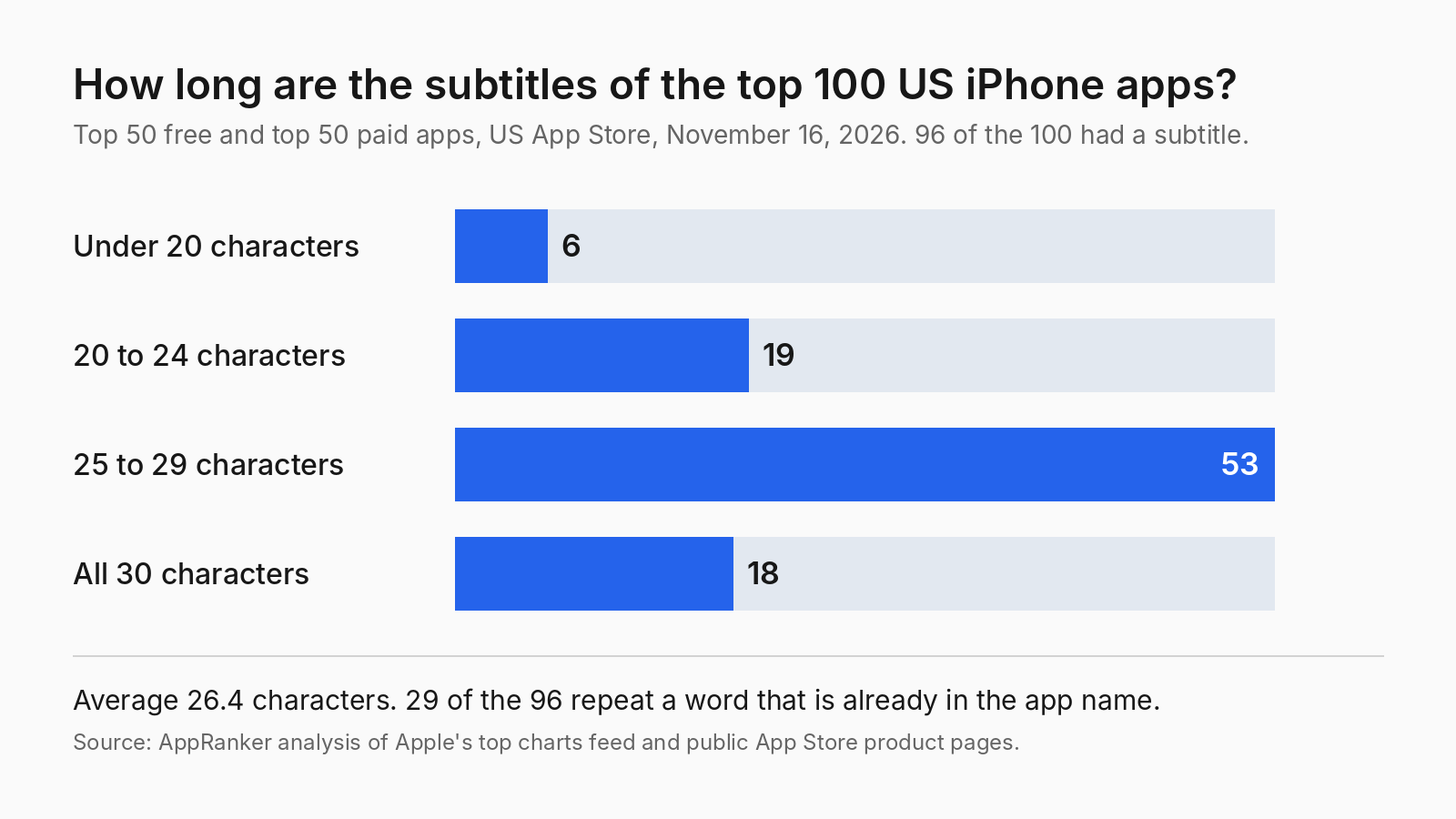
Most top apps use nearly all of the space. Chart: AppRanker
What we found:
- 96 of 100 had a subtitle. The four without one showed their category name ("Business", "Music", "Entertainment", "Medical") in that line instead, which is a wasted spot.
- Most use nearly all 30 characters. The average was 26.4 characters, the median 27, and 71 of the 96 used 25 characters or more. Eighteen used exactly 30.
- 29 of 96 repeated a word from the app name, by a simple word match that ignores plurals. "Short Dramas" in the name and "short dramas & series" in the subtitle, for example. For search, the second copy adds nothing.
- Slogans belong mostly to household names. We counted nine subtitles that name no feature or use at all, such as "Join the conversation" (Threads), "Connection starts here" (Facebook) and "Fast. Secure. Powerful." (Telegram). Apps people search for by name can afford that. A new app cannot.
- Smaller paid apps are the most literal. "Habit Tracker & To-Do List" (Streaks), "Conduit Bending Calculator" (QuickBend), "Live air traffic control radio" (LiveATC Air Radio) and "Sleep Cycle Monitor & Alarm" (AutoSleep) each read like the search a buyer would type.
This is one day's snapshot of one country's charts, and the apps at the top rank for many reasons besides their subtitles. Treat it as a picture of common practice, not proof of what ranks.
How to write an App Store subtitle, step by step
Step 1: Start from search terms, not a tagline
List the phrases people use to look for an app like yours. Our guide to free ASO keyword research shows how to get them from Apple Ads search popularity, Google Play search terms and competitor listings. Mark the two or three phrases with real volume that describe your app's main job.
Step 2: Remove what the name already covers
Cross out every word that is already in your app name or primary category. If your name is "Streakly: Habit Tracker", the words "habit" and "tracker" are already indexed, so the subtitle should bring new ones, such as "routines", "goals" or "planner".
Step 3: Draft three versions in different patterns
| Pattern | Example (fictional apps) | Good for |
|---|---|---|
| Main job + second job | "Budget planner & bill tracker" | Apps with two clear uses people search for |
| Job + audience | "Workout plans for beginners" | Niches where the audience is part of the query |
| Job + standout feature | "Offline maps with GPS tracks" | Crowded categories where one feature decides |
| Outcome in plain words | "Fall asleep faster, sleep sounds" | Wellness and lifestyle apps where intent is a result |
Keep it readable. The subtitle is the second thing a person reads in search results, so "Budget planner & bill tracker" works, while "Budget,bills,money,expense" reads as spam and invites a metadata rejection.
Step 4: Check the draft before you submit it
This Python script checks a subtitle against the 30-character limit, the rejection rules above, words already in your name, and words you could drop from your keyword field. It uses only the standard library, so it runs with any Python 3:
"""Check an App Store subtitle before you paste it into App Store Connect."""
import re
import sys

NAME = "Streakly: Habit Tracker"
SUBTITLE = "Daily routines & goal planner"
KEYWORDS = "routine,goals,planner,reminder,streak,journal"
COMPETITORS = ["habitica", "streaks", "fabulous"]  # names you must not use

PRICE = re.compile(r"[$€£¥]|\bfree\b|\d+\s*%|\bsale\b|\bdiscount\b", re.I)
CLAIMS = re.compile(r"#\s*1|\bbest\b|\bnumber one\b|\btop[- ]rated\b", re.I)
KIDS = re.compile(r"\bfor (kids|children)\b", re.I)


def words(text):
    """Lowercase words with a trailing plural 's' removed, so goal == goals."""
    return {w.rstrip("s") for w in re.findall(r"[a-z0-9]+", text.lower()) if len(w) > 2}


problems = []
if len(SUBTITLE) > 30:
    problems.append(f"{len(SUBTITLE)} characters: Apple allows 30")
if PRICE.search(SUBTITLE):
    problems.append("looks like pricing information (Guideline 2.3.7)")
if CLAIMS.search(SUBTITLE):
    problems.append("unverifiable claim such as '#1' or 'best' (Guideline 2.3.7)")
if KIDS.search(SUBTITLE):
    problems.append("'for kids' is reserved for the Kids category (Guideline 2.3.8)")
if words(SUBTITLE) & set(COMPETITORS):
    problems.append("names another app (Guideline 2.3.7)")

repeated = words(NAME) & words(SUBTITLE)
if repeated:
    problems.append(f"repeats words from the name: {', '.join(sorted(repeated))}")
in_keywords = words(SUBTITLE) & words(KEYWORDS.replace(",", " "))
if in_keywords:
    problems.append(f"also in the keyword field, free those characters: {', '.join(sorted(in_keywords))}")

print(f"{SUBTITLE!r}: {len(SUBTITLE)}/30 characters, {30 - len(SUBTITLE)} left")
for problem in problems:
    print(" -", problem)
sys.exit(1 if problems else 0)
With the sample values it prints:
'Daily routines & goal planner': 29/30 characters, 1 left
 - also in the keyword field, free those characters: goal, planner, routine
That is a good result, not a failure: the subtitle is fine, and "routine", "goals" and "planner" can now leave the keyword field to make room for new words. The word lists are deliberately short; add the competitor names and claim words that matter in your category. Our post on App Store search in 2026 has a matching checker for the keyword field itself.
Step 5: Read it where people will see it
Put the name and subtitle together on one line and read them as a search result: "Streakly: Habit Tracker, Daily routines & goal planner." Does a stranger know what the app does? Does it match the first screenshot? If the subtitle says "goal planner" and the first screenshot shows a streak calendar, one of them needs to change.
Step 6: Localize it
Write a subtitle for each language you list, from that language's search terms rather than a direct translation. A phrase people search for in English often has a different common wording in Spanish or German.
How to test a new subtitle
Since you cannot A/B test a subtitle, test it in sequence:
- Record a baseline. In App Store Connect analytics, note four weeks of impressions from App Store search, product page views, conversion rate and first-time downloads. Our guide to App Store Connect analytics shows where each metric lives.
- Ship the new subtitle with a version, and change nothing else in your metadata in the same release if you can.
- Compare two to four weeks later. More search impressions suggest the new words matched more queries. A higher conversion rate suggests the line persuades better. Check where you rank for the target phrases, too; our post on App Store keyword ranking shows a free way to track that.
- Keep or revert with the next version.
Seasonality and other releases add noise, so look for a clear change rather than a few percent. Apple Ads can help you choose before you ship: run the candidate phrases as exact-match keywords and see which ones bring taps and installs. Our guide to Apple Ads on a small budget covers that setup.
What about Google Play?
Google Play has no subtitle. The nearest field is the short description, up to 80 characters, shown on your store listing. Google does not publish how much each field counts in search, but ASO practitioners treat the short description as indexed. Our guide to the Google Play short description covers its rules. You can reuse the phrase from your subtitle there and extend it with the extra 50 characters.
App Store subtitle checklist
- 30 characters or fewer, counted with spaces and punctuation
- Names what the app does in words people search for
- No word already in the app name or primary category
- Words now covered by the subtitle removed from the keyword field
- No prices, discounts, other apps' names or unverifiable claims
- No "for kids" wording unless the app is in the Kids category
- Reads naturally next to the name, and matches the first screenshot
- Written per language, not machine-translated
- Baseline recorded before the change, results checked two to four weeks after
Your subtitle works inside the store, your links work outside it
A good subtitle helps your app get found and chosen by people who are already searching the App Store. It does nothing for the people who have not opened the store yet. That traffic comes from the places you link from: your website, your launch posts, directories and leaderboards.
AppRanker is one of those places: an Outbid alternative for apps and extensions, a pay-to-rank leaderboard where App Store, Google Play and browser extension listings are ordered by what each has paid, with no account and no review queue. A listing links straight to your product page, so the visitors it sends meet the name, subtitle and screenshots you have just improved. At the time of writing a new listing starts at $5, rank is a plain sort on what each listing has paid, and a position buys visibility, not installs. You can check what any place on the board costs before you pay.
If your subscriptions are the next thing to improve, our guide to App Store 12-month commitment plans shows how to offer a yearly plan billed monthly, and if your product page is converting but large downloads are putting people off, see how to reduce app size.
FAQ
How many characters can an App Store subtitle have?
Up to 30 characters, including spaces and punctuation. App Store Connect will not accept a longer one. The app name has the same 30-character limit.
Does the App Store subtitle affect search ranking?
Yes. Apple says search results use text relevance from your app's title, subtitle, keywords and primary category, together with user behavior such as downloads, ratings and reviews. Words in the subtitle can match searches on their own or combined with words in your name and keyword field.
Can I change my App Store subtitle without submitting an update?
No. Apple says you can update your subtitle when submitting a new version of your app. Promotional text is the field you can change at any time, but it does not affect search ranking.
Should I repeat keywords from my app name in the subtitle?
No. Apple tells you not to repeat words from your name, subtitle or category in the keyword field, and the same logic applies between name and subtitle: a second copy of a word adds no new search coverage. In our sample of top US apps, 29 of 96 subtitles repeated a word from the app name.
Why was my App Store subtitle rejected?
The usual reasons are in Guideline 2.3.7: prices or sale wording, the name of another app, an unverifiable claim such as "#1" or "best", or content that does not fit the field. Terms like "For Kids" are also reserved for apps in the Kids category under Guideline 2.3.8.
Can a custom product page have a different subtitle?
No. Custom product pages can change screenshots, app previews, promotional text, keywords and the deep link. The name, subtitle, icon and description stay the same as your default product page.
Does Google Play have a subtitle?
No. Google Play's closest field is the short description, up to 80 characters, which appears on your store listing. Google does not publish field weights, but it is widely treated as read for search, after the app title.
Image credits
- Cover, hand holding an iPhone with app icons: photo by Luis Quintero on Pexels, Pexels License. Cropped to 1200x630.
- Wikipedia app product page: image by RWambua-WMF, via Wikimedia Commons, CC BY-SA 4.0. Cropped and resized.
- Subtitle length chart: AppRanker, from Apple's US top free and top paid charts and public App Store product pages, November 16, 2026.