- Google Play
- Android
- Policy
Google Play's contacts permission policy and the location button: what Android 17 apps must change
Google Play's contacts permission policy and location button rules for Android 17 apps: who must switch to the pickers, the declarations, and the key dates.
AppRanker team12 min read
On this page
Google Play's contacts permission policy is about to start showing up in Play Console. From October 27, 2026, new pre-review checks will flag apps that may break the rules on contacts and location access, and Expensify opened a public issue on October 2 to remove READ_CONTACTS from its Android app before the deadline. If your app reads the address book or asks for precise location, this is the month to find out whether you are in scope, because the fix is mostly code, and code needs a release.
This guide covers what the policy says, which apps it affects, the two new Android 17 alternatives Google wants you to use (the Contact Picker and the location button), the Play Console declarations, and a migration plan for native, React Native, Flutter and Capacitor apps.
Key takeaways
- Apps targeting Android 17 (API level 37) or later may only request
READ_CONTACTSif the Android Contact Picker is not enough for a core feature, and must justify it in a Play Console declaration.- For one-time precise location, such as "search nearby" or an address picker, apps targeting Android 17 must use the Android location button instead of a persistent
ACCESS_FINE_LOCATIONgrant.- Pre-review checks in Play Console start flagging potential issues on October 27, 2026. Compliance is mandatory on January 27, 2027, with a 30-day self-extension in Play Console.
- Invites, referrals, file sharing and "pick a contact to pay" do not justify
READ_CONTACTS. A custom picker you built yourself does not qualify either.
What Google Play's contacts permission policy changes
Google announced the change in its April 15, 2026 policy update, which asks that apps use the picker, "or other privacy-focused alternatives like Sharesheet, as the primary way to access users' contacts." The Play Console Help page on restricted permissions spells out the rule: apps that target Android 17 or later may only request READ_CONTACTS "if the Android Contact Picker is not sufficient for your app to provide core functionality."
The same page lists the uses Google does not accept. Apps that request the permission only for "sharing files, collaborating, inviting/referring someone to join a service, choosing a contact to transact with" typically should not request it. That covers a large share of apps that ask for contacts today: the "invite friends" screen, the "split a bill with" screen, and the "send to" sheet.
Two details catch people out:
- Your own picker does not count. Google's FAQ says a custom contact picking experience "does not qualify as a reason to retain Contacts access."
- Contacts are personal and sensitive data under the User Data policy, whether or not you keep the permission. Your Data safety form still has to match what you collect.
Private and enterprise device management apps are exempt.
Use cases that can still justify READ_CONTACTS
The declaration form gives a list of user-facing features that can need broad access. Paraphrasing Google's table:
| Use case | Example |
|---|---|
| Contact management | Showing, editing and organizing all contacts |
| Dialing or SMS | Showing who you are calling or texting |
| Call history | A dialer showing which contact each call belongs to |
| CRM | Keeping notes on every business contact |
| Call screening | Blocking spam calls, which needs to know all saved contacts |
| Accessibility | "Call a specific contact" or read-aloud features |
| Personal assistants | "Send an email to..." style commands |
| Friend matching | Showing which of your contacts already use the app |
| Backup and restore | Copying contacts to a new device |
| Auto-correct or auto-complete | A keyboard that completes contact names |
If your feature is on this list and is core to the app, you can keep the permission, but you still have to complete the declaration and explain "why Contacts Picker is not sufficient."
The location button: minimum scope for precise location
The location half of the policy works the same way. Google's help page on foreground location and the location button asks every app to request the minimum scope it needs, along three dimensions: precision (coarse unless you truly need fine), persistence (one-time needs move to the button), and foreground versus background.
For apps targeting Android 17 and higher, the location button is "the required minimum scope method for obtaining precise location for 'transactional' (one-time) use cases." Google's examples:
- Search nearby: stores, ATMs or restaurants near the user.
- One-time sharing: sending your current location to a friend.
- Location tagging: adding a place to a photo or a post.
- Address pickers: autofilling a delivery address.
The button grants precise location "for a single session only, expiring as soon as the app session is closed." A persistent ACCESS_FINE_LOCATION grant stays available only when location is core to the app, such as turn-by-turn navigation or fitness tracking, and it is never allowed "for the sole purpose of advertising or analytics." Every app that requests precise location must complete a declaration explaining why the button or coarse location is not enough.
Coarse location is often all you need. Google's own examples for coarse access include local news, regional weather, store locators showing the nearest branches, and marketplaces showing items "within 5 miles."
Key dates for developers
| Date | What happens |
|---|---|
| April 15, 2026 | Contacts and location policies announced |
| September 2026 | Apps with READ_CONTACTS are prompted in Play Console to declare or remove it |
| October 2026 | Play policy insights in Android Studio flag apps that should use the new APIs |
| October 27, 2026 | Pre-review checks in Play Console start flagging contacts and location issues |
| November 2026 | The precise location declaration opens in Play Console |
| January 27, 2027 | Compliance mandatory for apps targeting Android 17+, with a 30-day self-extension |
Google says the location enforcement timeline "will harden as we gather more developer feedback," so check Play Console for updates. It is also explicit that there is no grandfathering: "All apps, both new and existing, that target Android 17+ must comply," and updates that do not "may be rejected."
The policy is tied to your targetSdk, not the user's Android version. Google has not published a date on its policy page for when Play will require API 37, but the yearly cadence (API 36 for updates from August 31, 2026, as we covered in our target API 36 migration guide) points to the second half of 2027. Do not plan on staying below 37 to avoid this: the work is smaller now than in a rushed target-SDK release next summer.
Step 1: Find every place your app reads contacts or location
Start with the merged manifest, not your own AndroidManifest.xml. A library can add a permission you never wrote. After a release build, open the merged manifest in Android Studio (the Merged Manifest tab of your manifest) or read it from the build output, then search for the four permissions that matter here:
./gradlew :app:processReleaseManifest
grep -rhoE 'android.permission.(READ_CONTACTS|WRITE_CONTACTS|ACCESS_FINE_LOCATION|ACCESS_COARSE_LOCATION)' \
  app/build/intermediates/merged_manifests/release/ | sort | uniq -c
The exact output folder varies between Android Gradle Plugin versions, so if the path is empty, search app/build/intermediates for AndroidManifest.xml. For each permission you find, write down:
- Which screen or feature uses it.
- Whether the user starts the action (tapping "Invite", "Use my location") or the app reads data in the background.
- Whether the feature needs one contact, a few, or the whole address book; one location fix or a continuous stream.
Anything in the "user starts it, needs a little" column is a picker or button candidate.
Step 2: Replace contact access with the Android Contact Picker
The Contact Picker is a system screen where the user chooses which contacts, and which fields, to share. Your app gets temporary read access to that selection only, with no permission prompt.
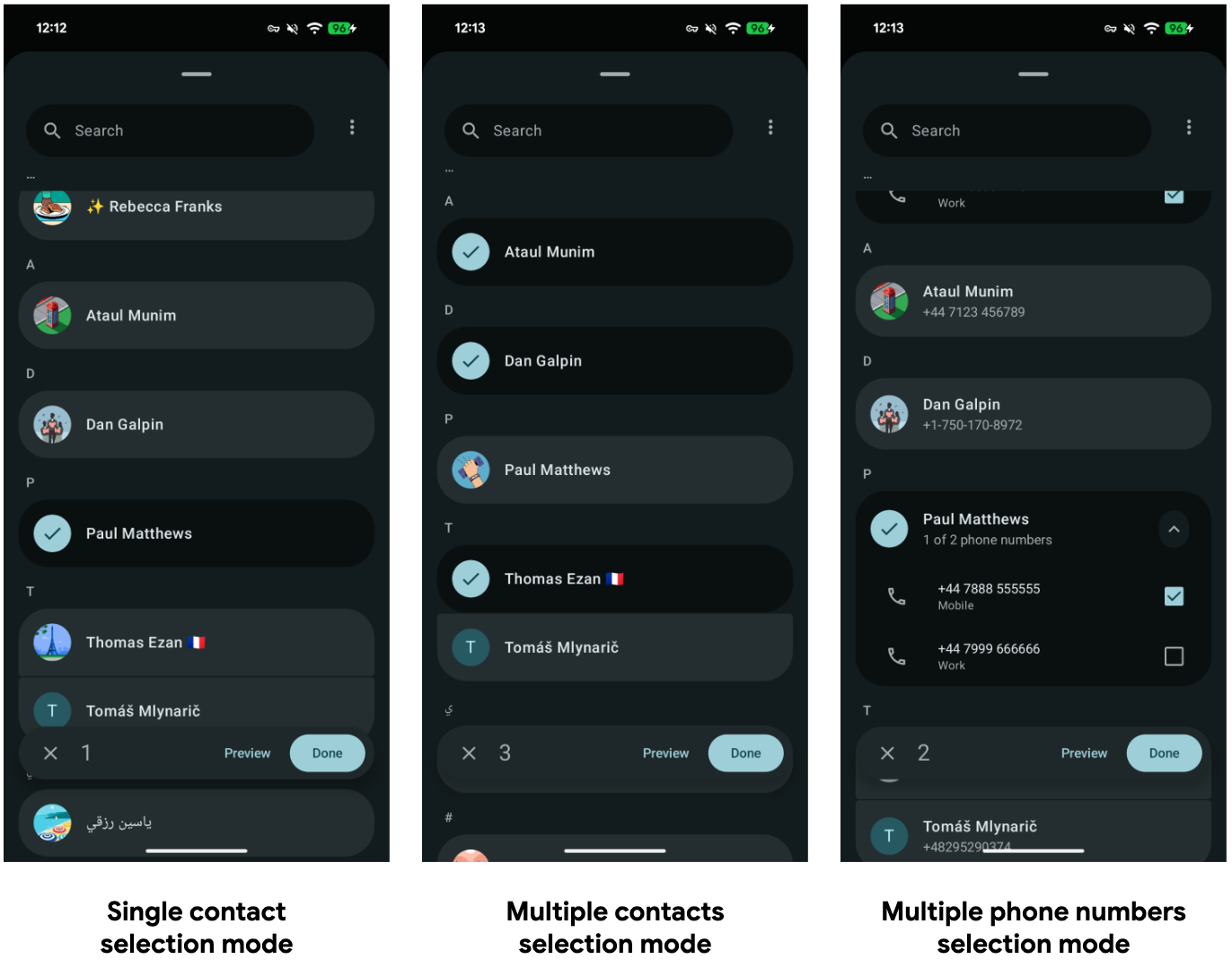
The picker adapts to what you request: one contact, several contacts, or a specific number. Image: Google, CC BY 4.0
Launch it with the requested data fields. This is Google's example for picking up to five contacts with an email or phone number:
val requestedFields = arrayListOf(
    Email.CONTENT_ITEM_TYPE,
    Phone.CONTENT_ITEM_TYPE,
)

val pickContactIntent = Intent(ACTION_PICK_CONTACTS).apply {
    putExtra(EXTRA_USE_SYSTEM_CONTACTS_PICKER, true)
    putExtra(Intent.EXTRA_ALLOW_MULTIPLE, true)
    putExtra(EXTRA_PICK_CONTACTS_SELECTION_LIMIT, 5)
    putStringArrayListExtra(
        EXTRA_PICK_CONTACTS_REQUESTED_DATA_FIELDS,
        requestedFields
    )
}

pickContact.launch(pickContactIntent)
The result is a single session URI. Query it with a ContentResolver on a background thread, reading LOOKUP_KEY, DISPLAY_NAME_PRIMARY, MIMETYPE and DATA1, and copy what you need right away: the access is temporary. Google also warns that session URIs "don't support custom selection and selectionArgs," and setting them throws an exception.
Two compatibility notes from Google's documentation:
- The picker exists only on Android 17 and later; it is not backported. On older devices, keep your existing
ACTION_PICKflow for a single contact, which has never neededREAD_CONTACTS. - For apps targeting Android 17, the system upgrades legacy
ACTION_PICKcontact intents to the new picker automatically. You only get multi-select, multiple fields and work profile switching by using the new intent.
When the feature is "invite a friend", consider whether you need contacts at all. A plain Sharesheet with your invite link lets the user choose WhatsApp, SMS or email, and needs no permission.
Step 3: Add the location button for one-time precise location
The location button is a system-rendered button with a fixed location icon and a label from a short list, such as "Use precise location." You can change its colors and corner radius, but not the icon.
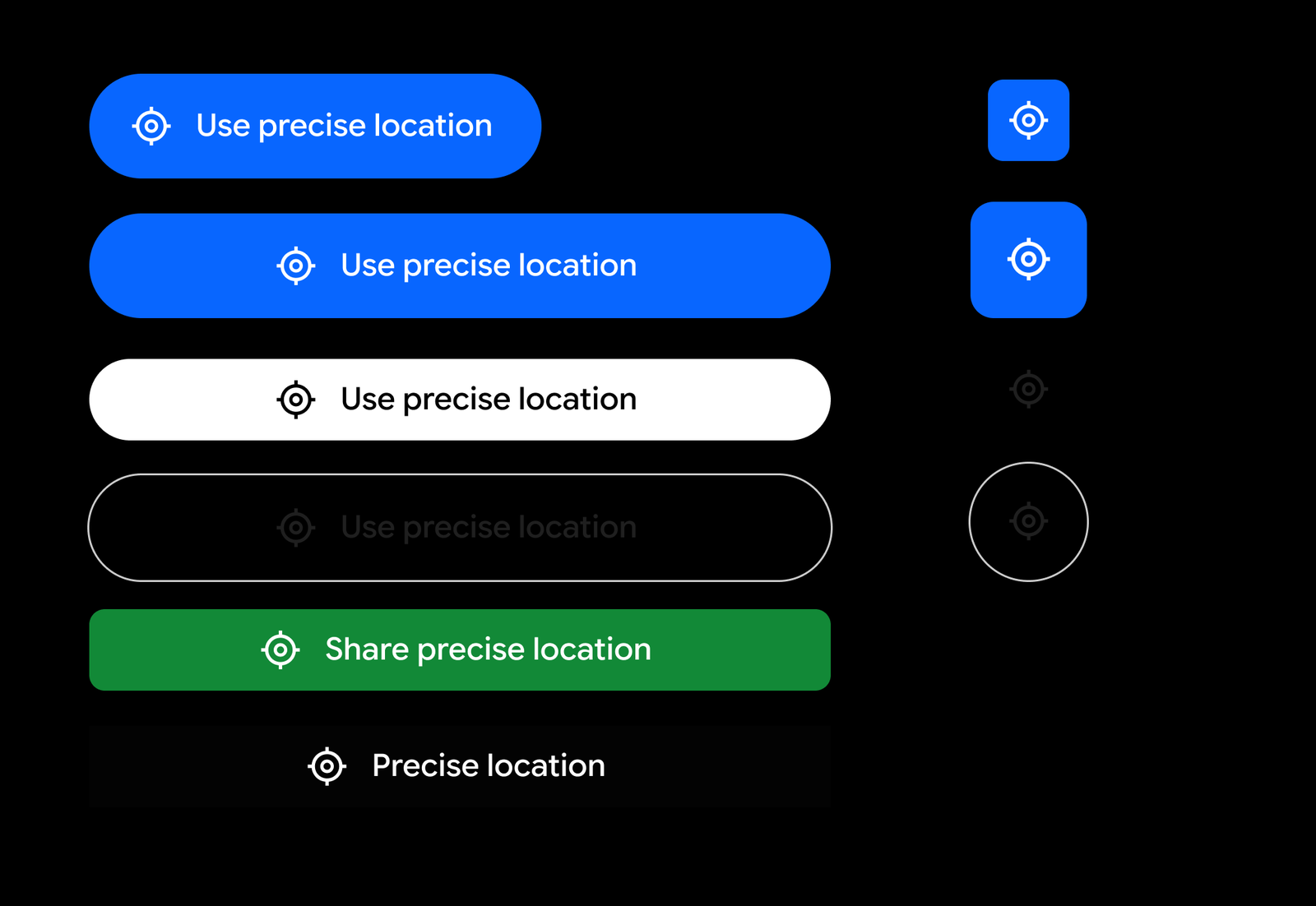
The icon is fixed; colors, shape and the label (from a set list) are yours. Image: Google, CC BY 4.0
Declare it in the manifest. The onlyForLocationButton flag tells the system, and Play, that you use precise location only through the button:
<uses-permission android:name="android.permission.ACCESS_COARSE_LOCATION" />
<uses-permission
    android:name="android.permission.ACCESS_FINE_LOCATION"
    android:usesPermissionFlags="onlyForLocationButton" />
<uses-permission android:name="android.permission.USE_LOCATION_BUTTON" />
Then add the button. In Compose, from the experimental Jetpack library androidx.core:core-locationbutton:
LocationButton(
    onPermissionResult = { isGranted ->
        if (isGranted) searchNearby() else showCityPicker()
    },
    textType = LocationButtonTextType.NearMyPreciseLocation,
)
Google notes that the library is experimental (version 1.0.0-alpha01 at the time of writing) and "subject to change." On Android 16 and lower, it falls back to a locally drawn button that triggers the standard permission prompt, so one code path covers every device.
Always have a fallback for "no": a city or postcode field keeps a nearby search usable for people who decline.
Step 4: Fix cross-platform plugins and libraries
Many React Native, Flutter and Capacitor apps pick up READ_CONTACTS from a plugin. Capgo's write-up on the contacts policy for Capacitor describes the common pattern: a plugin opens the old picker for a whole contact, then queries the address book for that contact's numbers and emails, and that second query needs the permission. In React Native, an open issue on react-native-contacts notes that the library has no way to pick a single contact without broad access.
Your options, in order:
- Update the plugin if a newer version supports picking without the permission.
- Switch to a picker-only package for the feature that only needs one contact, and remove the full-access library if nothing else uses it.
- Write a small native module around
ACTION_PICK_CONTACTSand the location button. Both are a single intent or composable, so the bridge is short.
Once nothing needs the permission, remove it from the merged manifest even if a dependency still declares it:
<manifest xmlns:android="http://schemas.android.com/apk/res/android"
    xmlns:tools="http://schemas.android.com/tools">
    <uses-permission android:name="android.permission.READ_CONTACTS"
        tools:node="remove" />
</manifest>
Test the release build after that: a library that still calls the contacts provider will now throw a SecurityException instead of silently reading data.
Step 5: File the declaration, or remove the permission
If you keep READ_CONTACTS or a persistent ACCESS_FINE_LOCATION grant, the Play Console declaration asks two questions: which user-facing features need the permission (from the use case lists above, or "Other"), and why the picker, the button or coarse location is not enough.
Write the answer the way a reviewer will test it:
- Name the feature as it appears in the app and on your store listing ("Call blocking checks every incoming number against your contacts").
- Say what breaks with the alternative ("The Contact Picker returns only contacts the user selects, so unsaved spam numbers cannot be told apart from friends").
- Make sure the reviewer can reach the feature, with test credentials if it sits behind a login.
- Make sure your store listing and Data safety form describe the same feature. Google's location rules require that precise access be essential to "the main purpose of the app or major product feature as promoted in your Store listing."
If you removed the permission, release the update that removes it before you dismiss the prompt. A declaration for a permission still sitting in your active release is not the same as being compliant.
Why this matters for your Play listing
A rejected update is a growth problem, not just a compliance one. A bug fix, a new feature or a holiday promotion that cannot ship because of a permission flag stalls everything else you had planned. Permission prompts also cost installs and ratings: a contacts or location prompt on first launch is one of the fastest ways to lose a new user before they see the app.
If you are preparing a release around this change, it is a good moment to review the rest of your store presence too. Our Google Play ASO guide for 2026 covers the listing changes Play shipped this year, and the Android developer verification checklist covers the other account-level requirement many teams are working through.
Checklist: Google Play contacts and location permissions
- Merged release manifest checked for
READ_CONTACTS,WRITE_CONTACTS,ACCESS_FINE_LOCATIONandACCESS_COARSE_LOCATION. - Each permission mapped to the feature that uses it, and to "one-time" or "ongoing".
- Invite, referral, sharing and "pay a contact" flows moved to the Contact Picker or the Sharesheet.
- Nearby search, check-in, tagging and address autofill moved to the location button, with a manual fallback.
- Coarse location used wherever street-level accuracy is not needed.
- Plugins updated or replaced; unused permissions removed with
tools:node="remove". - Release build tested on an Android 17 device and an older one.
- Declaration filed for any permission you keep, matching your store listing and Data safety form.
- Pre-review check results reviewed in Play Console after October 27, 2026.
Ship the fix, then get the app seen
Once the release is out, the next job is getting people to the listing. Our guide on how to promote your app for free covers tracked links, communities and store tools. On AppRanker you can list your Google Play app on a public leaderboard by pasting its store link; rank is a plain sort on what each listing has paid, and every row links straight to your Play page.
FAQ
Does the Google Play contacts permission policy apply if my app targets Android 16?
The READ_CONTACTS restriction applies to apps that target Android 17 (API level 37) or later. Apps on a lower target are not in scope yet, but they will be once you raise targetSdk, and Play raises the minimum target every year. Google has also prompted every app with READ_CONTACTS in Play Console since September 2026.
Can I keep READ_CONTACTS for an "invite friends" feature?
Usually not. Google's help page says apps that request the permission only for "inviting/referring someone to join a service" typically should not request it. Use the Contact Picker for the people the user chooses, or share an invite link through the Sharesheet.
Is the Contact Picker available on older Android versions?
No. Google says the Contact Picker "is not backported to previous versions and only exists for Android 17 or later." On older devices, the existing single-contact ACTION_PICK intent still works without READ_CONTACTS.
What is the onlyForLocationButton flag?
It is a usesPermissionFlags value on ACCESS_FINE_LOCATION in your manifest. It declares that your app gets precise location only through the Android location button, which grants it for one session. Google's help page shows it as the way to declare button-only use.
What happens if I miss January 27, 2027?
Google says that after that date "all apps in scope are subject to enforcement if not compliant," and that updates to existing apps that do not meet the standards may be rejected. A 30-day self-extension will be available in Play Console, but it only moves the date by a month.
Image credits
- Cover, smartphone beside a GPS reference point: photo by Raimond Spekking, via Wikimedia Commons, CC BY-SA 4.0. Cropped to 1200x630.
- Android Contact Picker modes: Contact picker documentation, Google, CC BY 4.0.
- Location button styles: Location button documentation, Google, CC BY 4.0. Transparent background filled black and resized.