- Android
- Google Play
- Checklist
Target API 36 before November 1: what breaks on Android 16 and how to fix it
Google Play's target API 36 extension ends November 1, 2026. What breaks when you move to targetSdk 36, from edge-to-edge to predictive back, and the fixes.
AppRanker team11 min read
On this page
If you asked Google Play for more time to move your Android app to API level 36, that time runs out on November 1, 2026. After that date, Play will not accept an update to your app until its targetSdk is 36 or higher. That includes the one-line crash fix you need to ship on a Friday night.
The version bump itself takes seconds. What takes time is everything Android 16 changes for apps that target it: edge-to-edge you can no longer opt out of, a back button that stops calling onBackPressed(), and tablets that ignore your portrait lock. As one developer put it in a write-up on DEV: "Nothing crashes, so CI stays green and the bug arrives via a screenshot from a user."
This guide covers what Google requires, each change that actually breaks apps, the fix for native, Flutter and React Native code, and a checklist to finish before the extension ends.
What Google Play requires, and when
The rules come from Google's target API level requirements page:
| Rule | Date | What it means |
|---|---|---|
| New apps and app updates must target Android 16 (API level 36) or higher | August 31, 2026 | No targetSdk 36, no new release on Play |
| Extension, requested through a form in Play Console | Until November 1, 2026 | One-time extra time, not a renewal |
| Existing apps must target API level 35 or higher | Ongoing | Below that, new users on newer Android versions cannot install the app |
| Wear OS and Android Automotive OS | August 31, 2026 | API level 35 is enough |
| Android TV and Android XR | August 31, 2026 | API level 34 is enough |
Permanently private apps, restricted to one organization for internal distribution, are exempt.
Two things trip people up here. First, the requirement is about releases, not about the app staying in the store. An app that already targets 35 stays installable; you just cannot update it. Second, the date that matters is the next time you need to ship. If a payment SDK breaks or a store policy forces a change in December, you will be doing this migration under pressure instead of now.
Check what your live release targets
Before planning anything, confirm the number. In Play Console, App bundle explorer shows the target SDK of each uploaded bundle. For an APK you have locally:
aapt2 dump badging app-release.apk | grep -o "targetSdkVersion:'[0-9]*'"
If you build with Flutter 3.38 or later, flutter.targetSdkVersion is already API 36 by default, according to the Flutter 3.38 release post. React Native's community template targets SDK 36 from 0.81. Upgrading the framework is often what flips the number, which is why some teams only discover the changes below after a routine upgrade.
Edge-to-edge is no longer optional
Android 15 made edge-to-edge the default for apps targeting API 35, but you could opt out with the android:windowOptOutEdgeToEdgeEnforcement theme attribute. According to Google's Android 16 behavior changes, that attribute is deprecated and disabled for apps targeting Android 16 when they run on Android 16. Your app now draws behind the status bar and the navigation bar, and anything you did not pad will be covered.
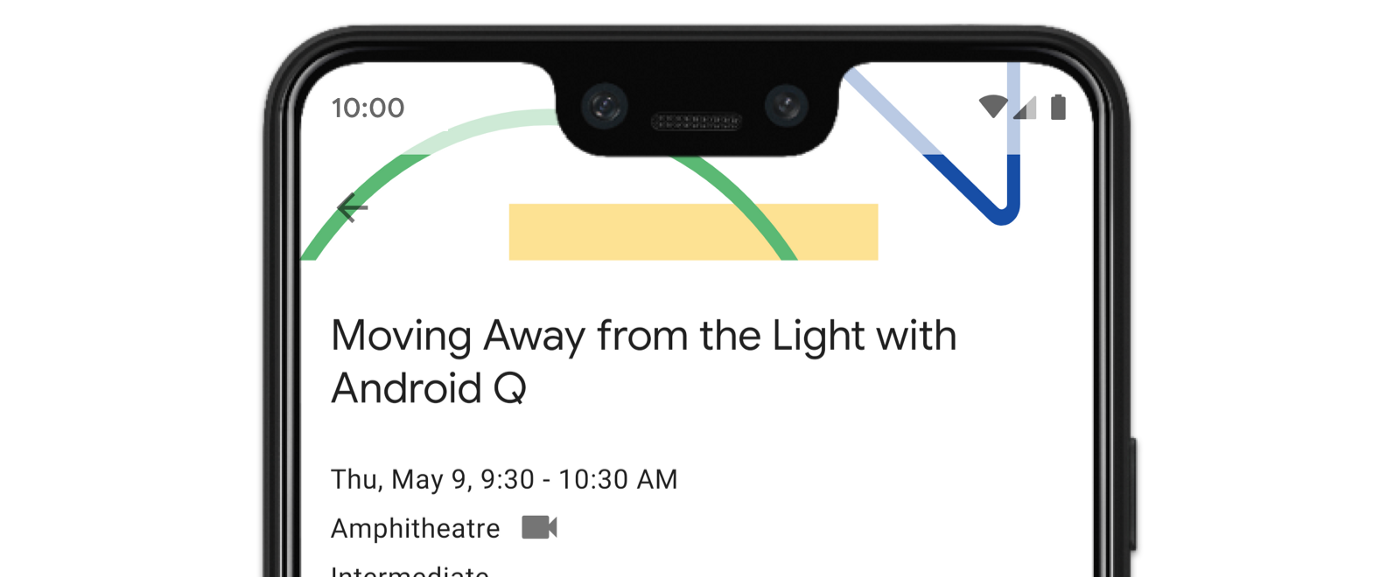
Edge-to-edge done on purpose: decorative imagery behind the status bar, text and buttons kept clear of it. Image: Google, from the Android Developers documentation, CC BY 2.5
The symptoms developers report are consistent. On the B4X forum, one developer described an app where, after targeting SDK 36, "the ActionBar is shifted down" and "the status bar icons disappear". On Stack Overflow, the questions are about bottom sheets picking up unexpected padding in landscape, and about the keyboard: one developer whose layout relied on adjustPan found that with edge-to-edge on, every view was "stacked together at the top" when the keyboard opened.
How to fix edge-to-edge in Views
- Remove
windowOptOutEdgeToEdgeEnforcementfrom every theme. It no longer protects you on Android 16, and leaving it in hides the problem on Android 15 test devices. - Call
enableEdgeToEdge()in each activity so Android 14 and older behave the same way, and stop calling the deprecatedsetStatusBarColor(). - Pad the views that hold content or touch targets with the system bar and display cutout insets. This is the pattern from Google's edge-to-edge guide:
ViewCompat.setOnApplyWindowInsetsListener(binding.recyclerView) { v, insets ->
    val bars = insets.getInsets(
        WindowInsetsCompat.Type.systemBars() or WindowInsetsCompat.Type.displayCutout()
    )
    v.updatePadding(left = bars.left, top = bars.top, right = bars.right, bottom = bars.bottom)
    WindowInsetsCompat.CONSUMED
}
- For screens with text fields, handle the keyboard explicitly with
WindowInsetsCompat.Type.ime()instead of relying onadjustPanoradjustResizeto move things for you. - Set the status bar icon color for light backgrounds through
WindowCompat.getInsetsController(window, window.decorView).isAppearanceLightStatusBars.
In Compose, Flutter and React Native
- Jetpack Compose: pass the
Scaffoldcontent padding down to your content, and useModifier.safeDrawingPadding()orModifier.imePadding()on screens without aScaffold. - Flutter: wrap screens in
SafeArea, or readMediaQuery.paddingOf(context)for custom layouts. Flutter's edge-to-edge breaking change page is blunt about the opt-out: "In Android 15, you could opt out of this behavior but, as of Android 16, you can't." It also warns that using the opt-out mechanism on Android 16 "might cause your app to crash". - React Native: move from the deprecated
<SafeAreaView>toreact-native-safe-area-context, and checkStatusBarbackgroundColorandtranslucent, which behave differently once edge-to-edge is on. React Native 0.81 added anedgeToEdgeEnabledGradle property to get the same layout on older Android versions too.
Predictive back: onBackPressed() stops being called
This is the change most likely to ship a real bug. For apps targeting Android 16, predictive back system animations are on by default, onBackPressed() is not called and KeyEvent.KEYCODE_BACK is not dispatched. Any custom back logic in those two places silently stops running.
The classic victim is the WebView wrapper. The old pattern overrode onBackPressed() to call webView.goBack(). After the upgrade, back exits the app instead of going back one page, which is exactly the regression the DEV write-up above describes. Others include "are you sure you want to discard this draft?" dialogs and custom fragment back stacks.
The fix: OnBackPressedCallback
Move custom back handling to OnBackPressedDispatcher, available in AndroidX Activity 1.6.0 and later. Google's predictive back guide recommends enabling a callback only while your app actually needs to intercept back, so the system can play its animation the rest of the time. For a WebView, that means tying the callback to the page history:
class BrowserActivity : AppCompatActivity() {
    private lateinit var webView: WebView

    private val webBack = object : OnBackPressedCallback(false) {
        override fun handleOnBackPressed() {
            webView.goBack()
        }
    }

    override fun onCreate(savedInstanceState: Bundle?) {
        super.onCreate(savedInstanceState)
        webView = WebView(this)
        setContentView(webView)
        onBackPressedDispatcher.addCallback(this, webBack)
        webView.webViewClient = object : WebViewClient() {
            override fun doUpdateVisitedHistory(view: WebView, url: String?, isReload: Boolean) {
                webBack.isEnabled = view.canGoBack()
            }
        }
    }
}
When the WebView has no history, the callback is disabled and back leaves the screen with the system animation, as users now expect.
- Compose: use
BackHandler(enabled = ...), orPredictiveBackHandlerif you want to animate with the gesture's progress. - Flutter: replace the deprecated
WillPopScopewithPopScopeand itsonPopInvokedWithResultcallback. Since Flutter 3.38, predictive back route transitions are on by default inMaterialApp. - React Native:
BackHandlerkeeps working in 0.81, but any native module that overridesonBackPressed()needs to move toOnBackPressedDispatcher.
If you cannot finish the migration before November 1, Google documents a temporary opt-out: android:enableOnBackInvokedCallback="false" on the <application> or on a single <activity>. Treat it as a stopgap for the activities that need it, not a fix.
Tablets and foldables ignore your orientation lock
On displays with a smallest width of 600dp or more, Android 16 ignores android:screenOrientation, android:resizeableActivity="false", android:minAspectRatio, android:maxAspectRatio and setRequestedOrientation() for apps that target it. Instead of being letterboxed, a portrait-only app fills a landscape tablet or an open foldable.
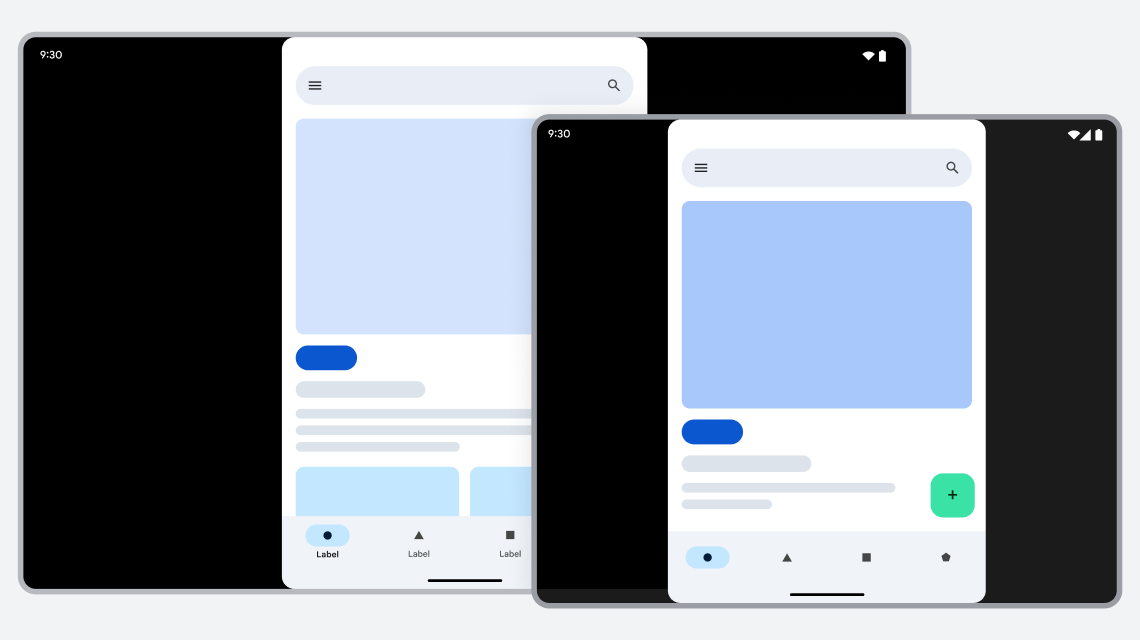
The old behavior: a portrait-locked app letterboxed on large screens. When you target API 36, Android 16 stretches it to fill the display instead. Image: Google, from the Android Developers documentation, CC BY 2.5
This explains a confusing Stack Overflow question, "ScreenOrientation=portrait is not being ignored even when targeting sdk 36": on a normal phone, your lock still works. The change only applies at 600dp and up, so you will not see it unless you test on a tablet or foldable. Games are exempt based on android:appCategory, and users can still choose the app's default behavior in the device's aspect ratio settings.
There is a temporary opt-out, a <property> element named android.window.PROPERTY_COMPAT_ALLOW_RESTRICTED_RESIZABILITY set to true on an activity or the whole application. Do not build a plan around it: Google's Android 17 behavior changes say the opt-out "will no longer be available for apps that target Android 17 (API level 37) or higher". The lasting fix is to make your main screens survive rotation and resizing:
- Keep screen state in a
ViewModelor saved state, so a configuration change does not reset a form, a video or a drawing canvas. - Test on the Pixel Tablet and Pixel Fold emulator images, in both orientations, and drag the window in multi-window mode.
- Cap the width of text-heavy layouts so lines do not run across a 12-inch screen.
- Check camera previews, which are the most common thing to look stretched or sideways.
Smaller changes that still bite
elegantTextHeightis ignored. Text in Arabic, Lao, Myanmar, Tamil, Gujarati, Kannada, Malayalam, Odia, Telugu and Thai can render with different line heights. If you localize into any of these, check for clipped text.- Fixed-rate tasks catch up only once.
ScheduledExecutorService.scheduleAtFixedRate()now runs at most one missed execution when the app returns to a valid lifecycle state, instead of all of them. - Heart rate permissions are more granular. Apps reading heart rate need the granular health permissions
READ_HEART_RATE(while in use) orREAD_HEALTH_DATA_IN_BACKGROUNDinstead ofBODY_SENSORSandBODY_SENSORS_BACKGROUND. MediaStore.getVersion()is unique per app. Do not parse the string or compare it across apps.- Bluetooth bond loss now has
ACTION_KEY_MISSINGandACTION_ENCRYPTION_CHANGEbroadcasts, and behavior can vary between manufacturers.
Plan one more deadline while you are in the build files. Google's 16 KB page size guide says that from February 1, 2027, updates to apps targeting Android 15 or higher that do not support 16 KB memory pages on 64-bit devices cannot be released. If your app ships native libraries, directly or through an SDK, verify alignment with zipalign -c -P 16 -v 4 app-release.apk or the Alignment column in Android Studio's APK Analyzer.
Your target API 36 migration checklist
Before you bump the number
- Live release's target SDK confirmed in App bundle explorer.
- Extension status checked in Play Console, and November 1 in the team calendar.
- Codebase searched for the APIs that change, for example with
grep -rnE "windowOptOutEdgeToEdgeEnforcement|onBackPressed|KEYCODE_BACK|screenOrientation|resizeableActivity|AspectRatio|elegantTextHeight|WillPopScope" app/src lib. - Framework upgraded first if you use Flutter or React Native, so its own back and insets handling is current.
Edge-to-edge
- Opt-out attribute removed from every theme.
- Every screen checked on an Android 16 device with gesture and three-button navigation.
- Keyboard handled with IME insets on every form.
- Bottom sheets, dialogs and full-screen video checked separately.
Back navigation
- No logic left in
onBackPressed()orKEYCODE_BACKhandlers. - WebView screens go back through page history before leaving.
- Unsaved-change dialogs still appear on back.
Large screens and the rest
- Main flows tested on tablet and foldable emulators in both orientations.
- State survives rotation and resizing.
- Localized text checked in the affected scripts.
- Native libraries checked for 16 KB alignment ahead of February 2027.
Release
- Staged rollout started, with crash rate and ANR rate watched in Android vitals.
- Screenshots retaken if the new edge-to-edge layout changed how the app looks.
After the update ships
A target SDK migration is invisible when it goes right, and very visible when it goes wrong: a back button that closes the app is the kind of bug that turns into one-star reviews within a day. Roll out in stages and read the reviews from Android 16 users first. If your app does slip below the target API rules, it can quietly stop being offered to new users on newer phones; our guide to why an app is not showing in store search walks through availability problems like that one.
While you are in Play Console, the Google Play ASO changes for 2026 cover the battery vital that can hide an app from recommendations, and the Android developer verification checklist covers the registration you need if you also distribute outside Play. Once the new version is live, you can paste its Google Play link on the AppRanker home page to see what a place on the board costs today.
FAQ
What is the Google Play target API level for 2026?
Since August 31, 2026, new apps and updates must target Android 16 (API level 36) or higher. Wear OS and Android Automotive OS apps need API level 35, and Android TV and Android XR apps need API level 34.
What happens if I miss the November 1 extension?
You cannot publish updates to Google Play until the app targets API 36. The current version stays on the store, and it remains available to new users on newer Android versions as long as it targets API 35 or higher.
Can I still opt out of edge-to-edge on Android 16?
No. When your app targets API 36, windowOptOutEdgeToEdgeEnforcement is disabled on Android 16 devices. It still works on Android 15, but you have to handle insets either way.
Why is onBackPressed() not called after targeting SDK 36?
Predictive back is enabled by default for apps targeting Android 16, so onBackPressed() is not called and KEYCODE_BACK is not dispatched. Move the logic to an OnBackPressedCallback, or to BackHandler in Compose and PopScope in Flutter.
Why is my portrait lock still working on my phone?
Android 16 only ignores orientation and resizability restrictions on displays with a smallest width of 600dp or more, such as tablets and open foldables. On a normal phone, screenOrientation still applies.
Does targeting API 36 also require 16 KB page size support?
They are separate requirements. The 16 KB rule applies to apps targeting Android 15 or higher that ship native code, and from February 1, 2027 Play blocks updates that do not support 16 KB pages.
Image credits
- Cover, Google Pixel and Pixel XL on paving stones: photo by Maurizio Pesce, via Wikimedia Commons, CC BY 2.0. Cropped to 1200x630.
- Imagery behind the status bar: from Display content edge-to-edge in views in the Android Developers documentation. Image: Google, CC BY 2.5.
- Portrait app letterboxed on a tablet and a foldable: from Device compatibility mode in the Android Developers documentation. Image: Google, CC BY 2.5.