- ASO
- App Store
- Google Play
App not showing in App Store or Google Play search? How to find out why
App not showing in App Store or Google Play search, even for its own name? A step-by-step diagnosis, from indexing and availability to vitals and support.
AppRanker team13 min read
On this page
Your app passed review. The direct link opens the store page. But when you type the app's name into the App Store or Google Play search box, it is nowhere to be found. It is one of the most common complaints on developer forums, and it is maddening, because it looks like the store is hiding you.
Most of the time, the cause is mundane: an indexing delay, a setting in App Store Connect or Play Console, a device or country filter, or a test track that never became a production release. Sometimes it is a store-side problem that only the store can fix. This guide walks through the checks in order, from the ones that take a minute to the ones that need a support ticket, so you can tell which situation you are in.
Key takeaways
- First prove the app is live: open the direct store link while signed out, on a phone in the country you are testing.
- "Not showing for my own name" in the first 24 to 72 hours is usually indexing, not a penalty.
- On both stores, availability (countries, devices, agreements, test tracks) hides more apps than ranking does.
- On Google Play, crash and ANR rates above the bad behavior thresholds can reduce visibility.
- If nothing explains it after a few days, contact the store with evidence, and say what changed just before it started.
Not ranking, or not indexed? Know which problem you have
Developers use "not showing in search" for two different problems, and they need different fixes.
- Not indexed: the app does not appear for any search, including its exact name or developer name, even though the direct link works. This is a visibility problem: something is filtering the app out or the store has not added it to search yet.
- Not ranking: the app appears for its exact name but not for the keywords you care about, such as "habit tracker". That is an App Store Optimization (ASO) problem, and the fix is in your metadata and your install history, not in a support ticket.
The threads on the Apple Developer Forums show the first problem over and over. One developer reported an app that was "not appearing in App Store search for over 6 weeks, including branded searches for its own name". Another wrote that their app had "dropped off search ranking. Completely unlisted for branded or key term searches". A third saw the app disappear right after an update that changed keywords and category. If that sounds like you, keep reading. If your app does show up for its name and you want it to rank for more terms, skip ahead to the section on ranking.
Step 1: Confirm the app is actually live
Before blaming search, prove the listing is published and reachable for a normal user.
- Open the direct link in a clean session. Use a private browser window, or a device signed in with an account that is not on your team. For the App Store the link is
https://apps.apple.com/<country>/app/id<APP_ID>; for Google Play it ishttps://play.google.com/store/apps/details?id=<package.name>. - Check the status in the console. In App Store Connect the version should say Ready for Distribution. Pending Developer Release means Apple approved it but you still have to release it. On Google Play, the release must be on the Production track; Google's help page on visibility and discovery issues is explicit that apps in closed or internal tests do not appear in public search.
- Check what is still waiting to go live. If managed publishing is on in Play Console, approved changes sit under "Ready to publish" until you publish them yourself. Google explains this in Control when app changes are reviewed and published. A forgotten managed publishing toggle explains a lot of "my update is approved but the store still shows the old title" reports.
- Check your agreements. Apple's status reference notes that to distribute an app, your agreements must be in effect. An approved build does not help if the Account Holder has not accepted the latest agreements in the Business section.
The new personal account trap on Google Play
If you created a personal Play Console account after November 13, 2023, you cannot publish to production until you have run a closed test with at least 12 testers who stayed opted in for 14 days in a row, and then applied for production access. Google says the review of that application usually takes seven days or less. Until then your app can only be found by testers, which is exactly what "my app is published but not in search" looks like from the outside.
Step 2: Give indexing a fair window
New apps and new metadata are not searchable the moment the status changes. Apple's own help says availability changes "take effect immediately but may require up to 24 hours to be visible to all users" (Manage availability). Search indexing can take longer than that: developers on the forums commonly report 24 to 72 hours before a new app shows up for its own name, and a thread from April 2026 collected several reports of new apps still missing after that.
Google Play does not publish a fixed indexing time either, and developers report new apps taking from a few hours to a couple of days to become searchable. Its help pages are clearer about filters: device compatibility and country are listed as reasons a user cannot find an app.
What to do while you wait:
- Do not resubmit or pull the app to "force a re-index". In the six-week Apple thread above, the developer removed the app from sale and re-added it, and it had no effect. Each change can restart the clock.
- Note the exact time the status changed, and test search once or twice a day from the same device and country, so you can tell support exactly how long it has been.
- Test your name exactly and with variations. A forum reply on an app that vanished for its exact name found it still appeared when the name was searched without the space, with a dash, or in quotes. That is useful evidence for a support ticket, not a fix in itself.
Step 3: Check where the app is allowed to appear
Store search is filtered before it is ranked. If your app is filtered out for the person searching, it does not matter how good your keywords are.
Countries and regions
On the App Store you can release in any of 175 countries or regions. In App Store Connect, open your app, go to Pricing and Availability, scroll to App Availability and click Manage. The per-country status column tells you more than the checkbox does. Apple's list of availability statuses includes:
| Status | What it means |
|---|---|
| Processing to Available | Should be live within 24 hours; Apple asks you to contact it if it stays longer |
| Missing App Rating | No age rating has been set |
| Missing Tax Form | Not available in Brazil until Brazilian tax information is submitted |
| ICP Filing Number Missing or Invalid | Not available in China mainland without a valid ICP Filing Number |
| Cannot Sell App | Not available; hover over the status to see the reason |
The European Union is the one that catches most indie developers. Since February 17, 2025, Apple says apps without trader status are removed from the App Store in the EU until trader status is provided and verified, to comply with the Digital Services Act. If your app is visible from the US and invisible from France or Germany, check this first.
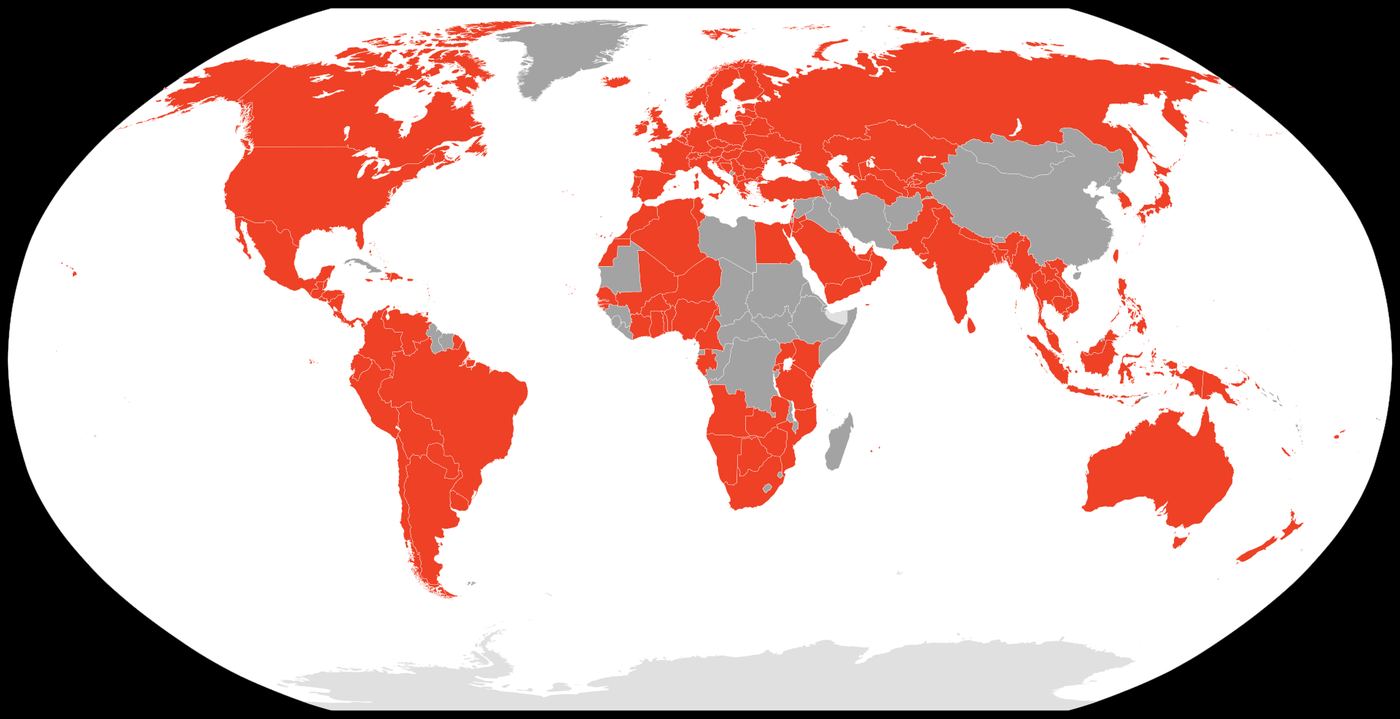
Google Play itself is not available everywhere, and your country list in Play Console narrows that further. Map: Akhenaten0, Wikimedia Commons, CC BY-SA 4.0
On Google Play, users only see apps available in their Play country. Google's Can't find an app page for users lists the country, device compatibility and parental controls as reasons an app does not show up. Paid apps are a special case: they are available in many countries, but not all.
Devices and platforms
An iPad-only app will not show up for someone searching on an iPhone, and the same goes for Mac or Apple Watch-only builds. Check the device families your build supports and the minimum OS version: if your test phone is a few versions behind, it is not a fair test.

Search from the device your users have. An app built for one device family can be invisible on another. Photo: Alejandro Escamilla / Unsplash, CC0
On Google Play, open Reach and devices, then Device catalog, to see which devices are supported, partially supported or excluded (View and restrict your app's compatible devices). Required hardware features in your manifest, a high minSdk or a manual exclusion can quietly remove whole groups of phones, including the one you are testing with.
Account-level filters
Parental controls and content ratings can hide an app for a specific user. If one person cannot find your app while everyone else can, as in this April 2026 forum thread, check that user's country setting, device and restrictions before anything else.
Step 4: On Google Play, check your vitals
Google Play is the one store that publishes rules for when it shows an app less. Android vitals has a set of core vitals that, in Google's words, "affect the visibility of your app on Google Play". The current bad behavior thresholds from the Android vitals documentation are:
| Core vital | Overall (average across devices) | Per phone model |
|---|---|---|
| User-perceived crash rate | 1.09% | 8% |
| User-perceived ANR rate | 0.47% | 8% |
| Excessive partial wake locks | 5% | n/a |
Google says that if an app exceeds a bad behavior threshold, "Play may reduce the visibility of your title" and may show users a warning on your store listing. Exceeding a per-device threshold mostly hurts you on those devices, which can look like "my app shows up on my Pixel but not on my friend's Samsung". The documentation also says apps exceeding the new memory usage thresholds may see store visibility impact starting from February 2027, so it is worth checking that tab now as well.
If your app's visibility dropped and a vitals metric is red, fix the crash or ANR first. No listing change will outweigh it.
Step 5: Rule out metadata problems
A few metadata mistakes can make an app hard to find even by name.
- A name that is mostly common words. "Focus Timer" is a brand to you and a generic query to the store. Hundreds of apps compete for it, and yours has no install history yet. A distinctive word in the name helps people find you by name.
- Keywords and terms you are not allowed to use. Apple's App Store search guidance asks you to avoid "unauthorized use of trademarked terms, celebrity names, or other protected words and phrases", competing app names and terms that are not relevant to the app. Remove them even if review let them through.
- A recent change to name, keywords or category. Search reflects your title, subtitle, keywords and primary category, so a big metadata change resets part of what the store knows about you. If the app vanished right after an update, that update is your lead suspect.
- A pricing model change. In the six-week thread, the developer eventually learned the problem started when the app switched from paid to freemium, which left a flag set on Apple's side. Their advice: if your app went invisible right after a pricing change, mention that transition when you contact Apple.
Step 6: When to contact the store, and what to send
If the app has been live for several days, passes every check above and still does not appear for its exact name, stop changing things and contact the store. Apple's first answer in the forum threads is often a generic "we don't guarantee app placement", which is about ranking, not indexing. You get a better answer by making it impossible to misread your report.
Send:
- The app ID or package name, and the direct link.
- The exact query you searched, the storefront country, the device and OS version, and the date and time.
- Confirmation that the direct link works and the developer page lists the app.
- What changed just before the problem started: a new version, a name or keyword change, a price or business model change, a country change.
- For Apple, also note whether the app appears in iTunes Search API results, which developers in the six-week thread used to show the app was in Apple's catalog but missing from App Store search.
For Apple, use the Contact Us form in your developer account; for Google, use the Help option in Play Console. Keep the ticket number and add new evidence to the same case rather than opening a new one.
Your "app not showing in search" checklist
Is it live?
- Direct link opens in a clean session, in the country you are testing.
- App Store Connect says Ready for Distribution, not Pending Developer Release.
- Agreements, tax and banking are complete.
- Play release is on the Production track, not a test track.
- Managed publishing is off, or the approved changes have been published.
- New personal Play account: closed test done and production access approved.
Is it allowed to appear?
- App shows Available in the storefront you are searching, not Missing App Rating, Missing Tax Form or Cannot Sell App.
- EU trader status provided and verified.
- Test device is in a supported device family and above the minimum OS or SDK.
- Play device catalog does not exclude the test device.
Is it healthy?
- Crash and ANR rates below the Android vitals bad behavior thresholds, overall and per device.
- No trademarked terms or competitor names in the name, subtitle or keywords.
Has it had time?
- At least 72 hours since the status changed, with no resubmissions in between.
- Evidence collected before contacting support.
If it shows for its name but not your keywords
Congratulations, you have the other problem. Once an app appears for its exact name, getting found for broader terms is about relevance and history: the words in your name, subtitle and keyword field on the App Store, your title and descriptions on Google Play, and the installs and ratings you collect over time.
Start with our free ASO keyword research guide to pick terms you can realistically rank for. For the rules of the App Store keyword field, see App Store search in 2026, and for Google Play's 2026 changes, our Google Play ASO guide. And because a new app has no search history to lean on, it helps to have a few places that send people straight to your store page. Our launch-week visibility checklist covers those, and on AppRanker you can paste your App Store or Google Play link to see what a place on the board costs today, with a rank that is a plain sort on what each listing has paid.
FAQ
Why is my app not showing in App Store search even when I search its exact name?
In the first 24 to 72 hours, it is usually indexing. After that, the common causes are availability (country, agreements, EU trader status, age rating), a device or OS mismatch on the phone you are testing, or a recent change to the name, keywords, category or pricing. If none of those apply, contact Apple with evidence.
How long does it take for a new app to appear in App Store search?
Apple says availability changes can take up to 24 hours to reach all users. Developers commonly report 24 to 72 hours before a new app shows up in search for its own name, and occasionally longer.
Why can't I find my app on Google Play after publishing?
Check that the release is on the Production track, that managed publishing has not held it back, that the country and device you are testing with are supported, and, for personal accounts created after November 13, 2023, that you completed the 12-tester, 14-day closed test and got production access.
Can bad crash rates hide my app on Google Play?
Yes. Google says user-perceived crash rate and ANR rate are core vitals that affect visibility, and that Play may reduce an app's visibility and show a warning on its listing when it exceeds the bad behavior thresholds: 1.09% overall or 8% on a phone model for crashes, 0.47% overall or 8% on a phone model for ANRs.
Should I remove my app from sale and re-add it to fix search?
It is a common suggestion, but in the reports we found it did not help, and it can make users unable to download the app while you wait. Collect evidence and contact the store instead.
Image credits
- Cover, hand holding a smartphone below a search bar: photo by Jernej Furman, via Wikimedia Commons, CC BY 2.0. Cropped to 1200x630.
- Google Play availability map: image by Akhenaten0, via Wikimedia Commons, CC BY-SA 4.0. Rendered to JPEG and resized.
- iPhone, iPad and notebook on a cafe table: photo by Alejandro Escamilla, originally on Unsplash, via Wikimedia Commons, CC0. Resized.