- Google Play
- Android
- React Native
DEX code optimization below threshold? How to enable R8 in React Native, Expo and Flutter apps
Play Console says DEX code optimization is below threshold? Turn on R8 in React Native, Expo, Flutter or Capacitor, fix release crashes and pass the 25% rule.
AppRanker team12 min read
On this page
A new warning has been turning up in Play Console since late August: "DEX code optimization is below our threshold", usually with a single low number next to it, such as "Obfuscation 2%", and a fix-by date of February 2027. It is showing up for apps that have never had a technical quality problem before, and a lot of them are cross-platform apps built with React Native, Expo, Capacitor or .NET.
The cause is almost always the same: the release build never runs R8, Android's code shrinker, because the project template ships with it switched off. This guide explains what Google is now measuring, why cross-platform apps fail it by default, and how to turn R8 on without shipping an app that crashes on launch.
What Google announced, and what the numbers mean
On August 26, 2026, Google Play announced new technical quality requirements that take effect in February 2027: thresholds for memory use, bitmap memory and DEX code optimization. The post says apps "must be optimized with a minimum of 25% coverage across optimization, shrinking, and obfuscation using a tool such as R8 or any other shrinking tool."
The Play Console technical quality requirements page fills in the details:
| Apps | Games | |
|---|---|---|
| Applies when DEX code is larger than | 10 MB | 50 MB |
| Minimum obfuscation | 25% | 25% |
| Minimum optimization | 25% | 25% |
| Minimum shrinking | 25% | 25% |
Each of the three numbers has to clear 25% on its own. Google says that missing the thresholds "can affect an app's visibility and publishing capabilities on Google Play", the same kind of consequence that the battery rule already carries, which we covered in our Google Play ASO 2026 guide. Any shrinker is acceptable; R8 is the one Google recommends and the one Android Gradle plugin already includes.
The three percentages measure how much of your Java and Kotlin code R8 is allowed to touch:
- Shrinking: the share of classes, fields and methods R8 may remove if unused.
- Optimization: the share it may rewrite, for example by inlining methods or merging classes.
- Obfuscation: the share it may rename to short names, which shrinks metadata and saves memory.
A score of 2% does not mean R8 did a bad job. It means R8 did not run at all, or ran with keep rules so broad that almost nothing is left for it to work on.
Why cross-platform apps fail this by default
Your JavaScript, Dart or C# business logic mostly does not live in DEX. A Hermes bundle in a React Native app and the AOT-compiled Dart code in a Flutter app are separate files. But the native side still adds up: the framework runtime, every native module or plugin, Firebase, ads SDKs, analytics and payment libraries are all Java or Kotlin bytecode. That is how a "JavaScript app" ends up with more than 10 MB of DEX.
Whether R8 runs depends on the template you started from:
| Stack | R8 in release builds by default | Where to look |
|---|---|---|
| React Native CLI (community template) | Off: enableProguardInReleaseBuilds = false |
android/app/build.gradle |
| Expo SDK 57 and earlier | Off | expo-build-properties |
| Expo SDK 58 (in beta since September 15) | On: android.enableMinifyInReleaseBuilds=true |
android/gradle.properties |
| Flutter | On, always, with the optimize preset | android/app/proguard-rules.pro |
| Capacitor | Off, and uses proguard-android.txt |
android/app/build.gradle |
| .NET for Android / MAUI | Runs with -dontobfuscate hardcoded |
Tracked upstream |
The React Native line comes straight from the community template's build.gradle. The Expo change is in the SDK 58 beta notes: "R8 is now enabled by default in release builds", optimized "with the proguard-android-optimize.txt preset". Flutter's Android deployment docs say code shrinking "is always enabled in release builds". The Capacitor default is from the Capacitor Android template, and the .NET limitation is dotnet/android issue #12535, opened the day after Google's announcement.
You can see the pattern in public repositories too. In the weeks since the announcement, open-source projects have filed issues quoting the same Play Console text, such as ActivityWatch for Android at "Obfuscation (2%)" and a Capacitor walkthrough from Capgo describing obfuscation "stuck around 3%".
Step 1: Check your own numbers first
Before changing anything, find out whether the rule applies to you:
- In Play Console, open your app and go to Test and release > App bundle explorer.
- Pick your latest production bundle with the picker in the top right.
- Read the DEX size and the obfuscation, optimization and shrinking percentages for that bundle.
If your DEX code is under 10 MB, the requirement does not apply to you yet. Turning R8 on is still worth it, since Google ties optimized bundles to faster starts and fewer ANRs, but it is not urgent. If you are over 10 MB and any number is under 25%, you have until February 2027, and every release you ship before then is a chance to test the change.
Step 2: Turn R8 on for your stack
React Native CLI
Flip the flag at the top of android/app/build.gradle and add resource shrinking to the release build type:
def enableProguardInReleaseBuilds = true

android {
    buildTypes {
        release {
            minifyEnabled enableProguardInReleaseBuilds
            shrinkResources enableProguardInReleaseBuilds
            proguardFiles getDefaultProguardFile("proguard-android-optimize.txt"), "proguard-rules.pro"
        }
    }
}
Keep proguard-android-optimize.txt. The Android docs on enabling app optimization warn that the older proguard-android.txt contains -dontoptimize, and Android Gradle plugin 9 dropped support for it. Also delete android.enableR8.fullMode=false from gradle.properties if an old upgrade left it there.
Expo
On SDK 58, R8 is on unless you turn it off. If you upgrade and something breaks in release, fix the keep rules rather than reaching for the opt-out, because the opt-out puts you straight back under the threshold.
On SDK 57 and earlier, use the expo-build-properties config plugin in app.json, then run npx expo prebuild or rebuild on EAS:
{
  "expo": {
    "plugins": [
      [
        "expo-build-properties",
        {
          "android": {
            "enableMinifyInReleaseBuilds": true,
            "enableShrinkResourcesInReleaseBuilds": true,
            "extraProguardRules": "-keep class com.example.reflected.Model { *; }"
          }
        }
      ]
    ]
  }
}
The extraProguardRules string is appended to android/app/proguard-rules.pro, so it survives a clean prebuild. See the expo-build-properties reference for every option.
Capacitor
The default Android project sets minifyEnabled false and points at proguard-android.txt. Change both, using the same block as the React Native example above, and avoid a blanket -keep class com.getcapacitor.** { *; }, which defeats most of the point.
Flutter
R8 already runs, so most Flutter apps pass. If yours is flagged, the cause is almost always a plugin or a line in proguard-rules.pro that keeps whole packages. Go to Step 4. Note that Dart's --obfuscate flag does not change these numbers: it obfuscates Dart code, not DEX.
Native Android and Kotlin Multiplatform
Check isMinifyEnabled in the Android app module of a KMP or Compose project. On Android Gradle plugin 9.3 and later, the release notes describe a new optimization block inside a build type that turns on code optimization and optimized resource shrinking together, with keep rules allowed in src/<variant>/keepRules/*.keep files, including in KMP modules. The older isMinifyEnabled DSL keeps working.
Step 3: Make sure the release build still works
The most common complaint about R8 is the one developers have been posting for years: "works in debug, crashes in release". R8 only runs on release builds, so a debug build or dev client tells you nothing. Build and run a release variant on a real device before you upload anything:
# React Native CLI
npx react-native run-android --mode release

# Expo (local build)
npx expo run:android --variant release

# Any Android project
./gradlew bundleRelease

Test the minified release build on a real phone or tablet, not a debug build or an emulator alone. Photo: Yuri Samoilov / Flickr, via Wikimedia Commons, CC BY 2.0
When R8 removes or renames something that is looked up by name at runtime, the symptoms are recognizable:
java.lang.ClassNotFoundExceptionon startup, often for a class named in the manifest or loaded by a string.NoSuchFieldExceptionorNoSuchMethodException, as in this Stack Overflow question about an Expo app whose "development build works, but release build crashes".- Data that silently goes missing because a model class was renamed before it was serialized.
A clear recent example is expo/expo issue #49779: on SDK 57, Calendar.createEventAsync() failed with "Event could not be saved" in minified release builds only, because R8 obfuscated a base class whose field names the module relied on. The reporter's workaround was -keep class expo.modules.calendar.** { *; }.
That workaround fixes the crash, but notice how wide it is. A few rules for writing keep rules that fix crashes without wrecking your scores:
- Start from R8's own suggestions. When a build fails on missing classes, R8 writes the rules it needs to
app/build/outputs/mapping/release/missing_rules.txt. Read them before copying anything from a forum. - Keep the class, not the package.
-keep class com.example.api.UserDto { *; }protects one model.-keep class com.example.** { *; }protects your whole app from optimization. - Keep members only when that is enough.
-keepclassmemberslets R8 still rename the class while keeping the fields a JSON parser reads. - Check library docs before adding rules. React Native, Expo modules and most maintained Android libraries ship consumer keep rules inside their packages. Adding your own copy usually just broadens them.
- Upgrade the library that crashes. A missing rule in a library is a library bug, and it may already be fixed in a newer version.
Step 4: Find the keep rules that are dragging your score down
If R8 is on and you are still flagged, a broad keep rule is almost certainly the reason. Google's new R8 Configuration Analyzer shows exactly which rule is blocking how much of your code.
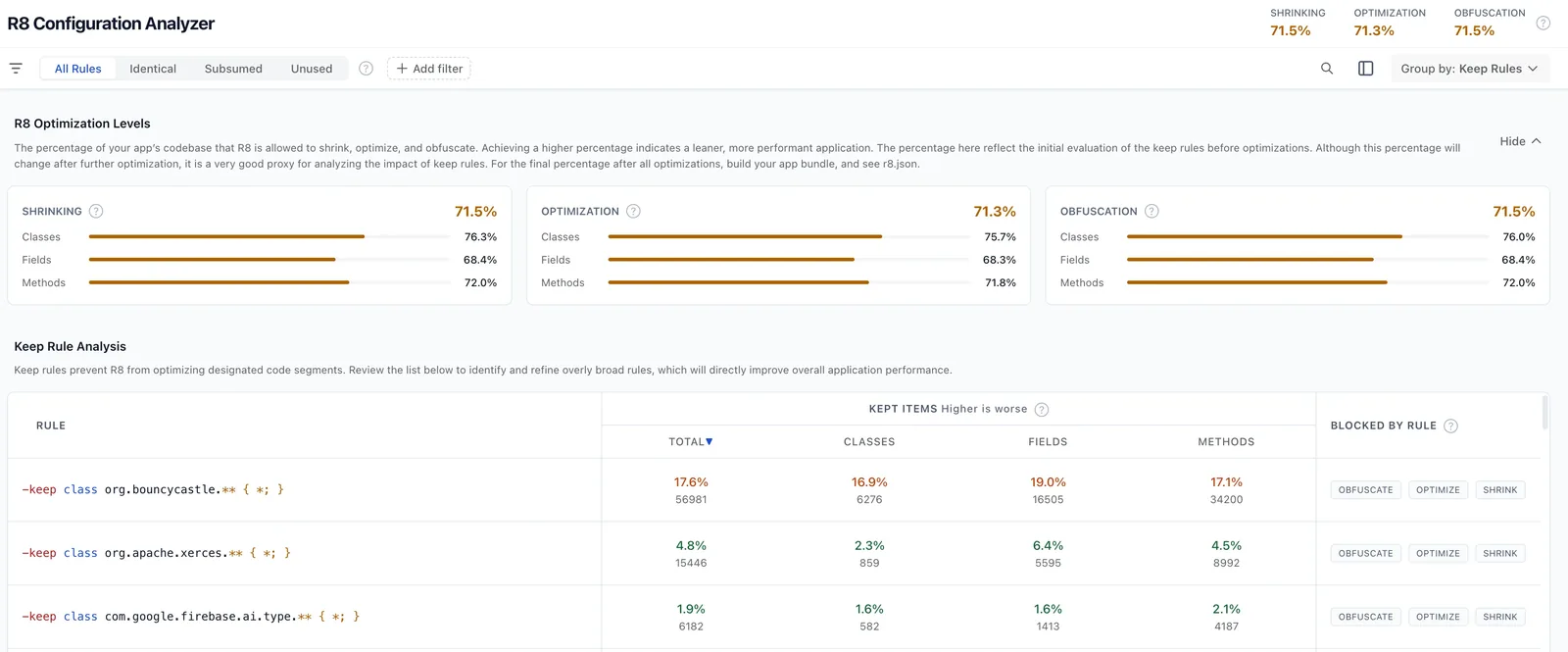
The analyzer scores the three metrics Play Console reports, then ranks keep rules by how much code each one blocks. Image: Google, CC BY 2.5
On Android Gradle plugin 9.3 or later, run it without building the whole bundle:
./gradlew :app:analyzeReleaseR8Config
The report is written to app/build/reports/r8/r8-config-analyzer-release.html. A normal assembleRelease also writes one to build/outputs/mapping/release/configanalyzer.html. On older plugin versions, the analyzer docs show how to pull in a newer R8 and generate the same report with a system property.
The report lists the keep rules that block the most classes, fields and methods, the library each one came from, rules that are subsumed by broader ones, and rules that match nothing at all. Google's Tinder case study credits tuning keep rules with the analyzer for a 47% cut in cold starts.
Third-party SDKs are often the culprit. An open issue on Google's mobile ads mediation repository, filed on September 29, measured mediation adapters and partner SDKs whose consumer rules each block between 5% and 10.6% of an app's live code, with -keep class com.inmobi.** { *; } as the headline example. You cannot edit a library's consumer rules directly, but you can upgrade, report the rule upstream with the analyzer's numbers, or drop an SDK that costs more than it earns.
Step 5: Keep your crash reports readable
Obfuscated stack traces are unreadable without the mapping file R8 produces. For Play's own crash and ANR reports, the Play Console help on deobfuscation says that with an app bundle and Android Gradle plugin 4.1 or later, "there's nothing you need to do": Play reads the mapping from the bundle. It is also why the old "There is no deobfuscation file associated with this App Bundle" warning should stop appearing once R8 is on.
Third-party crash reporters are different. Sentry, Crashlytics, Bugsnag and similar tools each need the mapping file uploaded through their own Gradle plugin or CLI, so check that step in CI after you switch R8 on. If you ever need to upload a mapping file to Play by hand, it goes in App bundle explorer > Downloads > Assets.
A checklist before February 2027
- Read DEX size and the three percentages in App bundle explorer for your latest bundle.
- Turn on R8 (
minifyEnabled) and resource shrinking for release builds only. - Use
proguard-android-optimize.txt, and removeandroid.enableR8.fullMode=false. - Build and run a release variant on a device, and walk through login, payments, deep links, push notifications and any screen that parses JSON.
- Replace package-wide
-keeprules with class- or member-level rules. - Run the R8 Configuration Analyzer and note which libraries add the broadest rules.
- Confirm your crash reporter receives the mapping file for each release.
- Ship to an internal or closed testing track first, then recheck the percentages in Play Console.
Faster apps are easier to recommend
None of this changes what your store listing says, but it changes how your app behaves on the cheap phones that make up much of Android's audience, and Google is now tying that to visibility. If you also distribute outside Play, our Android developer verification checklist covers the other big Android deadline of the year.
Once the build is in shape, the listing still has to be found. On AppRanker, Android apps sit on a board ranked by a plain sort on what each listing has paid, with each row linking straight to Google Play. You can paste your Play Store link on the home page to see what a place costs today, and our launch-week visibility checklist covers the rest of a release.
FAQ
What does "DEX code optimization is below our threshold" mean in Play Console?
It means at least one of three numbers for your app bundle (obfuscation, optimization or shrinking) is under 25%. From February 2027, apps with more than 10 MB of DEX code, and games with more than 50 MB, must reach 25% on all three or risk reduced visibility and publishing capabilities on Google Play.
Does a React Native or Expo app need R8?
If its DEX code is over 10 MB, effectively yes. The React Native community template and Expo SDK 57 and earlier ship with R8 off. Expo SDK 58 turns it on by default. Check your DEX size in App bundle explorer to see whether the rule applies.
Why does my app work in debug but crash in release after enabling R8?
R8 only runs on release builds. It removed or renamed code that is looked up by name at runtime, through reflection, JSON serialization, JNI or a class named in the manifest. Run a release build locally, read missing_rules.txt, and add narrow keep rules for the classes involved.
Do Flutter apps need to do anything?
Usually not. Flutter always runs R8 on release builds with the optimize preset. If Play flags a Flutter app, look for a plugin or a custom rule that keeps whole packages, and use the R8 Configuration Analyzer to find it.
Can I just disable obfuscation and keep shrinking?
Not if the rule applies to you. Obfuscation is one of the three numbers, and each must reach 25%. A global -dontobfuscate puts that number near zero, which is exactly the problem .NET for Android apps are reporting.
Do I need to upload mapping.txt to Play Console?
Not when you upload an app bundle built with Android Gradle plugin 4.1 or later: Play takes the mapping from the bundle. Third-party crash reporters need their own upload.
Image credits
- Cover, three Android phones: photo by Samsung Galaxy Note 10 & Google, via Wikimedia Commons, CC BY 3.0. Resized and cropped to 1200x630.
- Android tablet on a desk: photo by Yuri Samoilov, via Wikimedia Commons, CC BY 2.0. Resized.
- R8 Configuration Analyzer report: from Tinder cuts app cold starts by 47% with new R8 Configuration Analyzer on the Android Developers Blog. Image: Google, CC BY 2.5. Cropped and resized.