- Launch
- App promotion
- Indie makers
App launch announcement: social, email and press templates
App launch announcement templates for X, LinkedIn, Reddit, Show HN, email and press, plus the links and assets to prepare and when to post each one.
AppRanker team12 min read
On this page
An app launch announcement is the handful of posts, emails and notes that tell people your iOS or Android app is out and give them one tap to get it. Most indie launches spend months on the app and an evening on the announcement, and it shows: a post that says "I made an app!" with a bare link, sent ten minutes after release, to every channel at once, before the app is even visible in every country.
This guide gives you the parts every announcement needs, the assets to prepare once, and copy-and-edit templates for social posts, LinkedIn, community posts, Show HN, an email to your list and a short press note. Each template is written for a small team launching on the App Store, Google Play or both.
Key takeaways
- Every announcement needs five things: what the app does in one line, who it is for, what makes it different, proof (a short video or screenshots), and one link with the price.
- Do not announce the minute you press release. Apple says a manually released app "may take up to 24 hours" to appear on the App Store.
- Use campaign links and UTM tags so each announcement shows up separately in App Store Connect and Play Console.
- Follow the platforms' own rules: say an app is "available on the App Store", use the official badges, and never ask for upvotes on Hacker News.
- Stagger the posts over the first week instead of firing every channel at once.
What every app launch announcement needs
Whatever the channel and length, a launch announcement answers the same five questions, in roughly this order:
- What is it? One plain sentence: "Tally is a habit tracker for people who hate habit trackers." No category jargon, no "revolutionary".
- Who is it for? Name the person and the situation: "for freelancers who invoice from their phone", "for parents splitting chores between two homes".
- Why this one? The single thing it does differently. One reason beats five features.
- Proof. A 15 to 30 second screen recording, a GIF or two screenshots. People believe what they can see the app do.
- One link and the price. Free, free with a subscription, or a one-off price. Saying it up front saves the reader a tap and earns trust.
Everything after that (your story, the tech stack, what you learned) is optional and belongs lower down or in a follow-up post.
| Weak line | Stronger line |
|---|---|
| "My first app is finally live!" | "Tally is live on iPhone: a habit tracker with no streaks to lose." |
| "An all-in-one productivity solution" | "Turns a photo of a whiteboard into a checklist you can tick off." |
| "Please check it out and leave a review" | "Free for 3 habits, $9.99 once for unlimited. Feedback welcome." |
| "Available on all platforms soon" | "Out now on iPhone and iPad. Android in January." |
Prepare the assets once
Write the announcement after you have built the kit below. Every template reuses it.
Store links that tell you what worked
- App Store: Apple's App Store Marketing Tools generate short links, badges and QR codes that lead to your product page. Add App Store Connect campaign links (
ptandctparameters) so you can see each channel in your analytics. - Google Play: add
utm_sourceandutm_campaignto the Play link. Play Console reports those values under Ads and referrals (Play Console Help).
Our guide on how to promote your app for free walks through both link formats step by step. Make one link per channel: ct=x-launch, ct=reddit-launch, ct=newsletter and so on.
Badges and wording that follow the rules
Apple's marketing guidelines are specific about words as well as artwork. It is correct to say an app is "available on the App Store" or "can be downloaded from the App Store"; Apple says not to write "at the App Store", "Apple App Store" or "iPhone App Store". Onscreen, the App Store badge must be at least 40 px tall with clear space of a quarter of its height, and you should use one badge per layout.
Google's Google Play badge guidelines set a minimum digital height of 28 px, ask for the badge to be at least as large as other store badges beside it, and forbid recolouring or rearranging it. Download both from the official sources rather than copying them from another site.
Media
- One screen recording of 15 to 30 seconds showing the core action, exported as an MP4 and a GIF.
- Two or three screenshots with no marketing text, cropped to the device.
- Your app icon at 1024 px for press and directories.
- A one-paragraph description and a one-line description, written once and reused. Our guide on writing a store listing that converts helps with both.
Write the announcement on the laptop, then check every link on the phone your readers will use. Photo: Plann / Pexels
Wait until the app is live everywhere
Approval is not availability. Apple's release options page says that after you manually release a version, "it may take up to 24 hours for it to appear on the App Store." On Google Play, when managed publishing is on, Google says changes are "published on Google Play within a few minutes" of pressing Publish changes (managed publishing), but search can still take longer to find a new app.
Before the first post goes out:
- Open your store link on a phone signed in to each country you are announcing in.
- Search the store for your exact app name.
- Tap every link in every draft, including the tracked ones.
- Check that the price and the in-app purchase list match what the announcement says.
If the app is not showing up yet, our guide to an app not showing in App Store search lists the usual causes. For choosing the day and hour in the first place, see the best time to launch an app.
App launch announcement templates
Replace everything in square brackets. Keep the structure, cut whatever does not apply, and write the result in your own voice; a template that reads like a template gets ignored.
Short social post (X, Threads, Bluesky)
Short posts get one line of attention. Lead with the outcome, put the proof in the attached video, and keep the link last.
[App name] is out on [iPhone / Android / both] today.

It [does the one thing] for [who], without [the usual annoyance].

[Free / Free for X, then $Y / $Y once]. [Link]

[Attach the 20-second screen recording]
A follow-up reply under the post is a good place for one detail people ask about: what it is built with, why you made it, or what is next.
LinkedIn post
LinkedIn shows only the first lines before "see more", so the first two lines carry the post. It suits apps for work: productivity, finance, field work, education.
After [N months] of evenings, [App name] is live on [store].

[One sentence on the problem, in the words a customer would use.]

What it does:
- [Outcome 1]
- [Outcome 2]
- [Outcome 3]

Who it's for: [role or situation].
Price: [price].

If you [do the job the app helps with], I'd value your honest feedback.
[Link]
Community post (Reddit, Discord, forums)
Communities reward context and punish drive-by links. Say you are the developer, explain why you built it, and ask a real question. Read each community's rules first: many only allow self-promotion in a weekly thread or on set days, and some ban it outright.
Title: I built [App name], a [what it is] for [who]. Feedback welcome

I'm the developer. I made this because [specific frustration, one or two sentences].

What it does differently: [the one thing].
What it doesn't do (yet): [honest limit].
Platforms and price: [iOS / Android], [price].

I'd especially like feedback on [specific question: onboarding, pricing, a feature].
Link: [tracked link]
Show HN
Hacker News has its own rules for Show HN: the post must be something "people can run on their computers or hold in their hands", that you "worked on personally". Landing pages and sign-up pages are off topic, and "please don't ask friends to upvote or comment." An app that people can install and try without an account fits; a waitlist does not.
Title: Show HN: [App name] – [what it does, plainly]

[One paragraph: what it is and why you built it.]

[One paragraph: the interesting technical or design decision.
HN readers will ask, so answer first.]

It's [free / price] on [store]. No account needed to try [the core feature].
I'll be here to answer questions.
Email to your list
This is the one channel where people asked to hear from you, so it usually converts best. Send it to beta testers and waitlist subscribers first. In the US, the FTC's CAN-SPAM guide requires, among other things, that you "tell recipients where you're located" and "tell recipients how to opt out", so keep your postal address and an unsubscribe link in the footer.
Subject: [App name] is out (and it's [free / X% off this week])

Hi [first name],

You signed up to hear when [App name] launched. It's live today on [store].

[One sentence: what it does for them.]
[One sentence: what changed since the beta, if they tested it.]

[Download on the App Store badge]  [Get it on Google Play badge]

If you used the beta: thank you. If you have a minute, a rating on the store
helps more than anything else at this stage.

[Your name]
[Postal address] · [Unsubscribe]
Subject lines worth testing: "[App name] is live", "It's out: [App name] for [who]", "You can download [App name] now".
Short press note
Journalists and newsletter editors get far more pitches than they can read. Send a short note with a link to your press kit rather than a long release; our app press kit guide covers what goes in it.
Subject: [App name], a [category] app for [who], launches [date]

Hi [name],

[App name] launched today on [store]. It [one-line outcome].

Why it might interest your readers: [one specific angle tied to their beat].

Press kit with screenshots, video and icon: [link]
Promo code for the paid tier: [code or "on request"]

[Your name], [role], [App name]
When to post each one
A launch announcement works better as a short sequence than a single blast. A simple order for launch week:
| When | Channel | Why then |
|---|---|---|
| Launch day, once the listing is live | Email to beta testers and waitlist | Your warmest audience, and early ratings help everyone after them |
| Launch day | Social post and LinkedIn | Friends and followers share on day one |
| Day 2 or 3 | One community post | Gives you time to fix what day one found |
| Day 3 to 5 | Show HN, if it fits | Needs you free for hours to answer questions |
| Week 2 | Press notes and newsletters | Real numbers and early reviews make a better pitch |
Our launch-week visibility checklist covers the rest of the week, from the store page to the follow-up posts.
Keep the app visible after the posts scroll away
Every announcement above has a short life: a social post is gone from feeds in a day, and a community post sinks within hours. Some of your launch effort should go to places that stay up, such as directories with a permanent page; our list of where to submit your app compares them.
AppRanker is one of those places. It is a pay-to-rank leaderboard for apps and extensions where indie developers list App Store, Google Play and browser extension listings: paste the store link, pay $5 at the time of writing, and the app gets a row on the board that links straight to its store page, plus a listing page at /app/<storeId> with its rank, description and screenshots. Rank is a plain sort on what each listing has paid, and a listing's total never decays.
The listing page also comes with a 1200 by 630 share card built from your store art, so if you share the listing, the link previews properly.
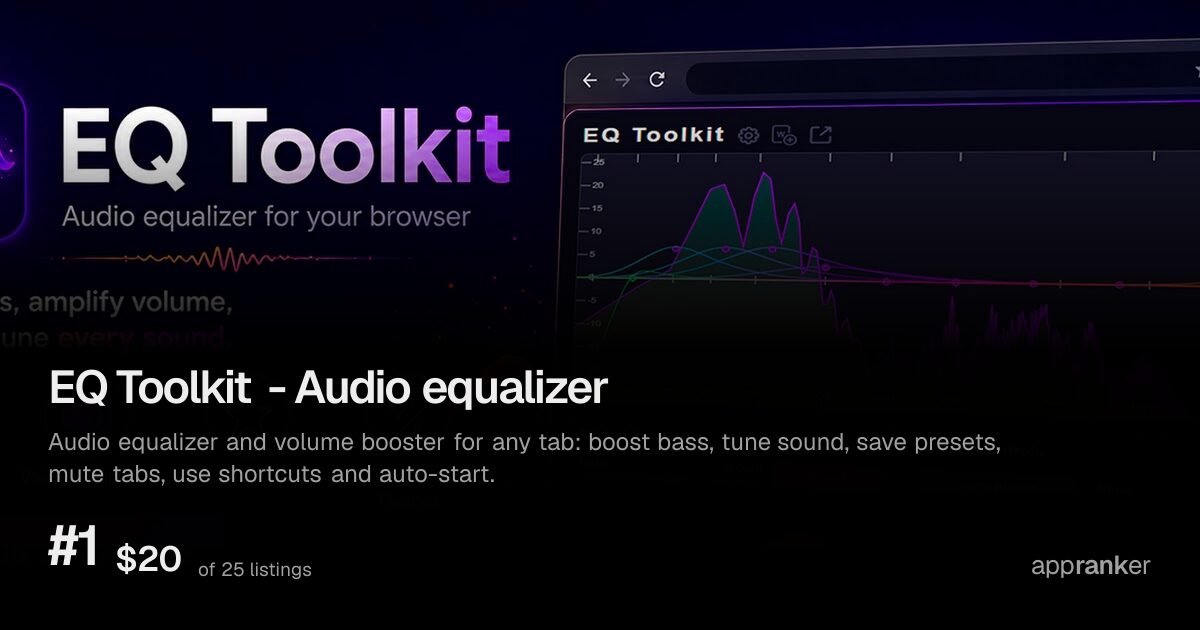
The share card a link to an AppRanker listing unfurls into, built from the app's own store art.
The share control on the listing page offers X, LinkedIn, Facebook and Reddit, plus copying the link, and every option uses the same canonical address.
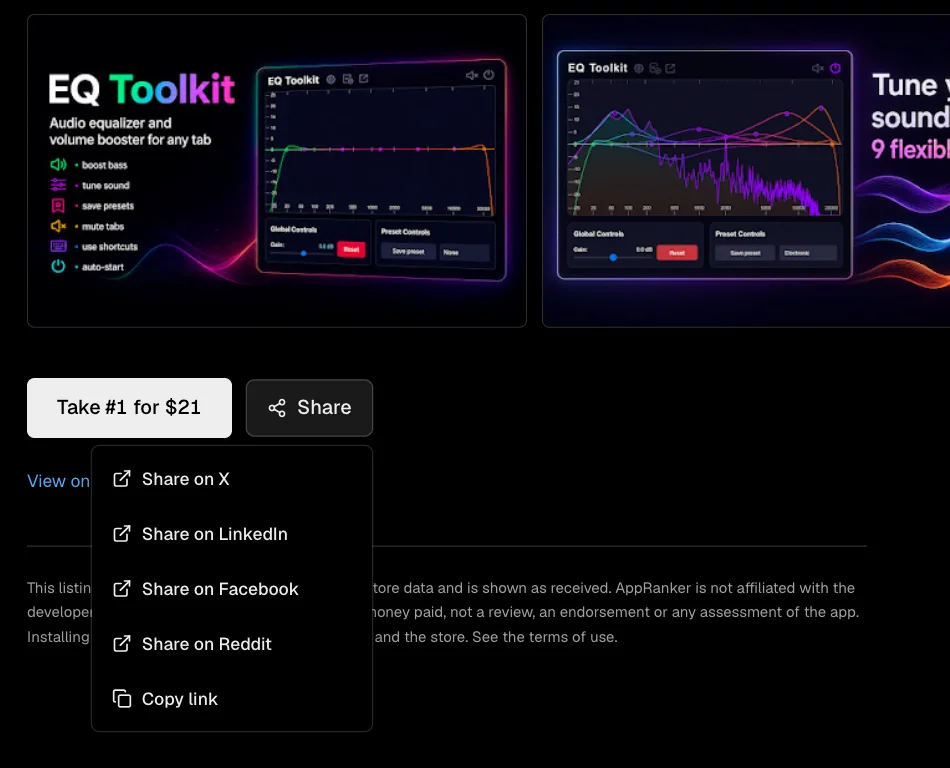
The share menu on a listing page. Every option shares the same /app/<storeId> address.
For most announcements, link straight to your store page with a campaign tag, as the templates do. The board's job is the weeks after, when people browsing for new apps can still find yours. A position buys visibility, not installs, and our post on what a leaderboard listing buys is honest about the limits. To see what a place would cost today, paste your store link on the home page.
Mistakes that sink a launch announcement
- Announcing before the app is visible. The first comment becomes "link doesn't work in my country", and that is the one people remember.
- One untagged link everywhere. You will never know which post brought downloads.
- Feature lists instead of an outcome. Readers decide in one line whether the app is for them.
- No price. "Free" that turns out to be a hard paywall reads as a bait-and-switch in the comments.
- Asking for upvotes or 5-star ratings. Hacker News forbids vote requests, and both stores ban incentivised or manipulated ratings.
- Posting everywhere in one hour. You cannot answer questions on six platforms at once, and unanswered questions look like an abandoned app.
App launch announcement checklist
- One-line description, one-paragraph description and price written down
- 15 to 30 second screen recording and two screenshots ready
- Tracked App Store and Google Play links for each channel
- Official badges downloaded and used at or above minimum size
- App visible in every announced country, and every link tested on a phone
- Email to testers and waitlist with address and unsubscribe link
- Social and LinkedIn posts on launch day, community post on day 2 or 3
- Show HN only if people can try the app without signing up
- Press notes sent in week 2 with a press kit link
- A placement that stays up after launch week
FAQ
How do you announce an app launch?
Prepare tracked store links and a short demo video, wait until the app is visible in every country you are announcing in, then email your testers and waitlist first. Post on social media the same day, in one or two communities over the next few days, and send press notes in week two.
What should an app launch post say?
What the app is in one sentence, who it is for, the one thing it does differently, proof in the form of a video or screenshots, and a single link with the price. Your backstory can go in a reply or a follow-up post.
When should I post my launch announcement?
After you have confirmed the app is live and searchable, not the moment you press release. On the App Store a manually released app can take up to 24 hours to appear. Pick a day when you are free to answer questions for the next several hours.
Should I send a press release for an app launch?
For most indie apps, a short personal note to a few relevant writers works better than a formal press release. Link to a press kit with screenshots, a video, the icon and a promo code so they have everything without replying.
Can I post a mobile app on Show HN?
Yes, if people can install and try it. Show HN is for things "people can run on their computers or hold in their hands", and it excludes landing pages and sign-up pages, so an app that needs an account before it does anything is a weaker fit.
How do I know which announcement brought downloads?
Give every channel its own campaign link: ct values in App Store links and utm_source and utm_campaign in Google Play links. App Store Connect and Play Console then show downloads per campaign.
Image credits
- Cover, phone and laptop on a cafe table: photo by Plann on Pexels, Pexels License. Cropped to 1200x630.
- Laptop and iPhone by a brick wall: photo by Plann on Pexels, Pexels License. Resized.