- Google Play
- Android
- Store listing
Google Play foldable requirements: April 2027 checklist
Google Play foldable requirements for April 2027: the Tier 3 quality bar, the three foldable screenshots, emulator capture commands and a script to check them.
AppRanker team13 min read
On this page
The new Google Play foldable requirements take effect in April 2027, and they touch both your code and your store listing. On November 18, 2026, Google said that from April 2027 new apps and app updates must meet the baseline Tier 3 "adaptive ready" quality guidelines for foldables, and must ship dedicated foldable screenshots with every submission. Apps that miss the bar "will no longer be able to publish or update on Google Play, and may have reduced visibility on the store," according to Google's announcement by Mekka Okereke, GM of Google Play Apps.
April sounds far away, but the screenshot upload is open now, the large-screen badge is open now, and a phone-only app that rotates badly is often a month of layout work. This checklist covers the dates, what Tier 3 actually tests, the exact screenshot shapes Play accepts, the emulator commands Google publishes to capture them, and a small script that checks your files before you upload.
Key takeaways
- From April 2027, new apps and updates on Google Play must meet Tier 3 (adaptive ready) for foldables and include at least three foldable screenshots. Games get the screenshot rule in April and the Tier 3 rule in August 2027.
- Apps that already exist and are not updated stay downloadable. The rule bites the next time you ship.
- Tier 3 means no letterboxing, state kept across fold, unfold, rotation and resizing, working multi-window, and basic keyboard, mouse and stylus input.
- Foldable screenshots need a 1:1 inner shot, plus a 4:3 inner and a 10:16 outer shot for apps. You can upload them in Play Console today.
- Meeting Tier 2 or Tier 1 already qualifies you to apply for large screen badging and enhanced merchandising.
Google Play foldable requirements: what changes and when
Google's post gives a three-step timeline. Here it is with the related game rules from Google's separate post for games:
| When | Apps | Games |
|---|---|---|
| November 2026 (now) | Foldable screenshots can be uploaded in Play Console; they appear on listings "over the next few weeks." Tier 2 and Tier 1 apps can apply for badging and enhanced merchandising. | Same screenshot upload and badging. |
| April 2027 | New apps and updates must meet Tier 3 and include dedicated foldable screenshots. | New games and updates must include foldable screenshots. |
| August 2027 | New apps and updates must target API level 37 (Android 17), and can no longer opt out of orientation and resizability restrictions on large screens. | Games must meet Tier 3 for large screens and foldables to publish new games and updates. |
Three details matter for planning:
- Existing listings are not pulled. Google says existing apps that are not updated "remain downloadable." The requirement applies at submission, so the first update you ship after April 2027 is the one that has to pass.
- Visibility is on the table. Google's wording is that non-compliant apps "may have reduced visibility on the store." For an app that depends on Play search and browse, that is the part to take seriously.
- The bar will rise. Google says the framework "will progressively expand to incorporate Tier 2 and Tier 1 standards across foldables, tablets, Googlebooks, and Android XR." Tier 3 is the floor for 2027, not the end state.
Google puts the large-screen market at "over 580 million" devices. The devices it names for the screenshot formats are the Samsung Galaxy Z Fold8 Ultra and Google Pixel 11 Pro Fold (1:1 inner displays) and the Samsung Galaxy Z Fold8 (4:3 inner display).
What Tier 3 "adaptive ready" actually checks
Tier 3 is defined in Android's adaptive app quality guidelines. Google describes it as the level where apps "run full screen on all form factors and provide basic support for external input devices." In practice it is ten guidelines in five groups:
| Area | Guideline | What has to work |
|---|---|---|
| Configuration and continuity | Config_Changes |
The app fills the window, is "not letterboxed" and does not run in compatibility mode. Scroll position, typed text and media playback survive rotation, fold and unfold, and window resizing. |
Config_Combinations |
Combinations, such as resizing then rotating, or rotating then unfolding. | |
| Multi-window | Multi-Window_Functionality |
The app is fully functional in split-screen and desktop windows. |
Multi-Resume |
The app keeps updating when another app has focus, and gives up and regains the camera and microphone correctly. | |
| Camera and media | Camera_Preview, Media_Projection |
Camera preview and screen projection keep the right orientation and proportions, folded or unfolded. |
| Input | Keyboard_Input, Mouse_Trackpad_Basic |
Typing with an external keyboard, and click, select and scroll with a mouse or trackpad. |
| Stylus | Stylus_Basic, Stylus_Text_Input |
Basic stylus use, which Android handles like touch, and handwriting into text fields on Android 14 and later. |
Two of these cause most of the work for phone-first apps.
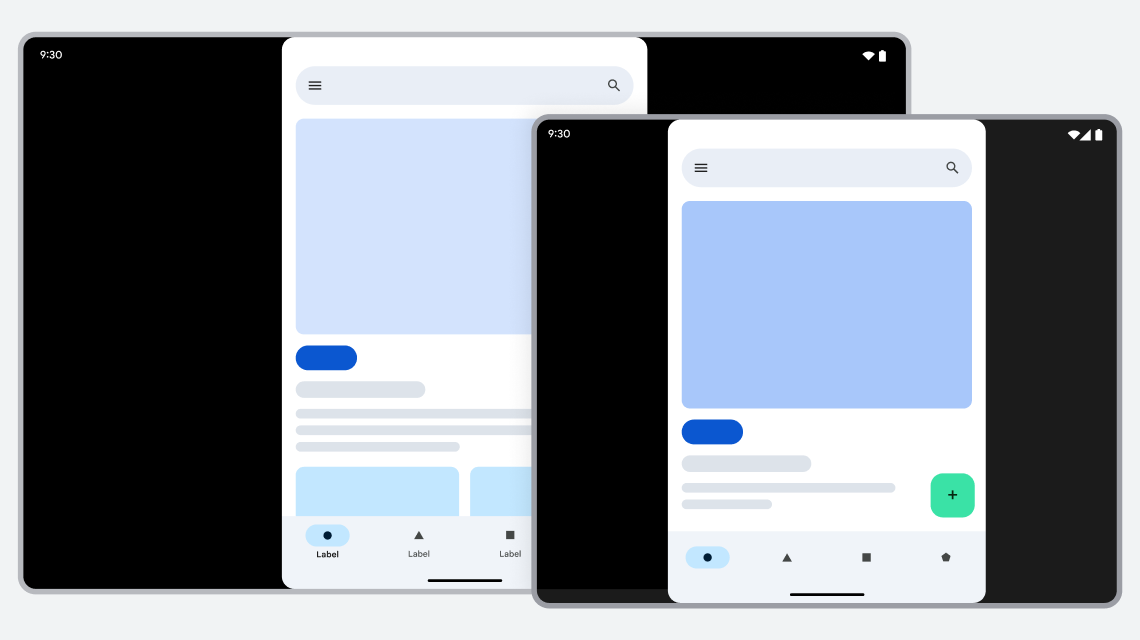
Letterboxing like this fails Tier 3: the app must fill the screen or its window. Image: Google, from the Android Developers documentation, CC BY 2.5
Letterboxing. If your manifest locks orientation (android:screenOrientation="portrait") or marks activities android:resizeableActivity="false", older Android versions letterbox the app on a large screen. Google's test procedure for Tier 3 runs on a large screen (smallest width of 600dp or more) with Android 12 or later, which supports all orientations "regardless of orientation restrictions" and multi-window "even for apps that have specified android:resizeableActivity="false"." So those attributes do not protect a phone layout; they just decide how bad it looks. Our Target API 36 guide explains how Android 16 already ignores these restrictions on large screens for apps that target it, and August 2027 removes the opt-out.
Lost state. Folding and unfolding is a configuration change. If a screen keeps its scroll position, form input or playback position in a plain field, it loses it when the activity is recreated. In Compose, keep UI state that must survive in rememberSaveable or a ViewModel with SavedStateHandle:
@Composable
fun SearchScreen(viewModel: SearchViewModel = viewModel()) {
    // Survives rotation, fold/unfold and resizing (configuration changes)
    var query by rememberSaveable { mutableStateOf("") }
    val listState = rememberLazyListState() // saved automatically
    val results by viewModel.results.collectAsStateWithLifecycle()

    Column {
        TextField(value = query, onValueChange = { query = it; viewModel.search(it) })
        LazyColumn(state = listState) {
            items(results) { ResultRow(it) }
        }
    }
}
How to test for Tier 3 on an emulator
You do not need to buy a foldable. Tier 3's test notes name two emulator profiles, Foldable (1:1 inner display) and Foldable (4:3 inner display), and Google's Android CLI screenshot guide creates both with one command each (Android Emulator 37.3.10 or later):
android emulator create foldable_1_1
android emulator create foldable_4_3
android emulator start foldable_4_3
android run ./app/build/outputs/apk/debug/app-debug.apk

# Fold and unfold from the command line while you watch the app
adb emu fold
adb emu unfold
adb shell wm user-rotation lock 1   # landscape
adb shell wm user-rotation lock 0   # portrait
Then walk every main screen through Google's T-Config_State routine: scroll a list, start playback and type into several fields, then rotate, fold, unfold and resize the window in split-screen. Scroll position, playback and text should all still be there. Finish with the input tests: connect a keyboard (or use your computer's keyboard in the emulator), click every control with the mouse, and scroll lists with the trackpad. Google also offers Android Device Streaming if you want a real Fold or Pixel Fold without owning one.
The foldable screenshot rules
The screenshot side is easier to get wrong than the code side, because the rules differ from phone screenshots. From Google's preview assets help page:
- 3 to 8 foldable screenshots, PNG or JPEG, up to 8 MB each, with each side between 960 px and 3,840 px. As with all Play screenshots, PNGs must be 24-bit with no alpha.
- Required for every app and game: at least one 1:1 unfolded inner-screen shot.
- Also required for apps: at least one 4:3 landscape inner-screen shot and one 10:16 portrait outer-screen shot.
- Also required for games: one 4:3 or 3:4 inner-screen shot and one 16:10 or 10:16 outer-screen shot, matching the game's primary orientation.
- Optional: up to five more in 4:3, 3:4, 16:10, 10:16, 1:1, 16:9 or 9:16.
- On 1:1 foldables, the outer screen uses a normal phone ratio, so Play shows your phone screenshots there.
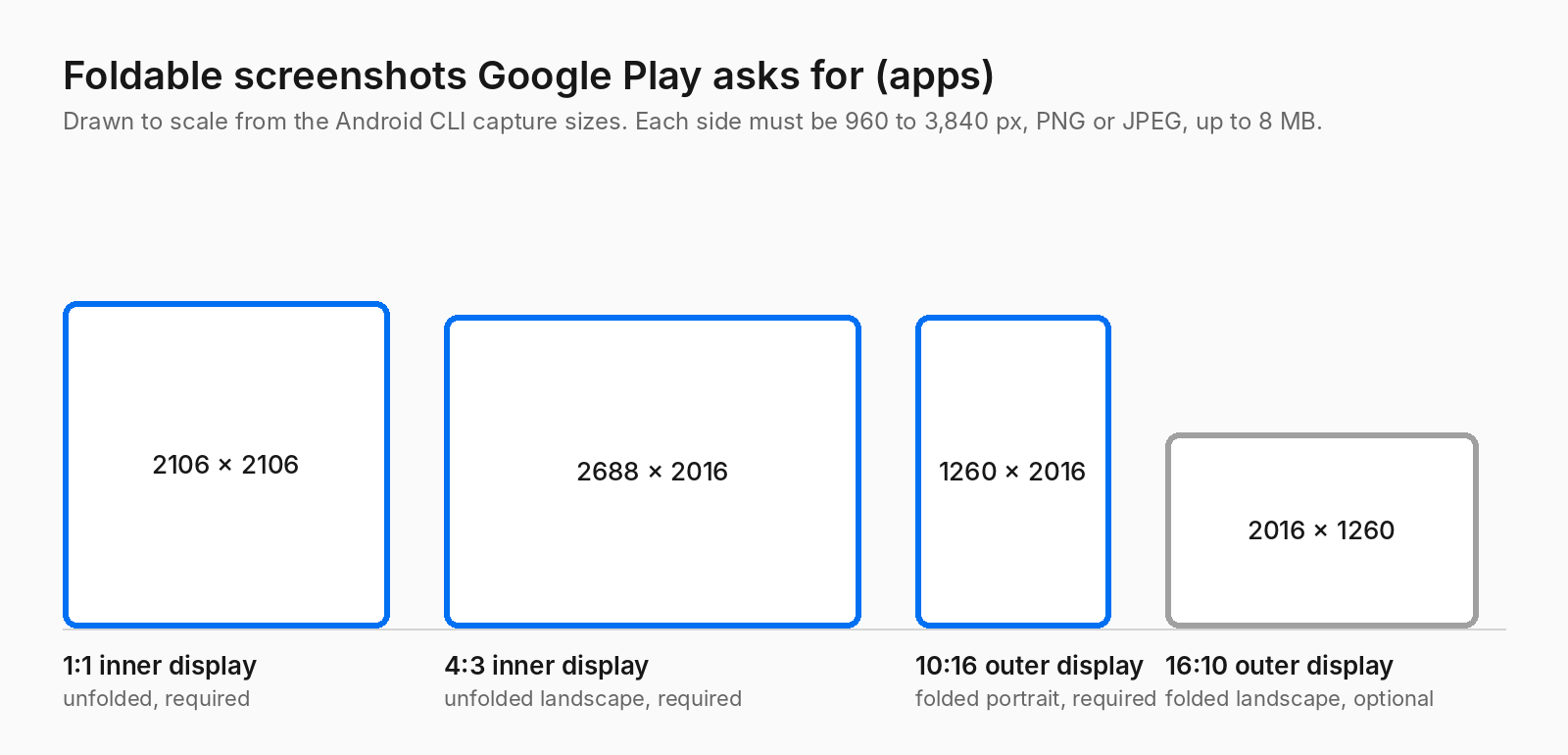
The three required foldable shapes for apps, and the optional folded landscape shot, at the sizes the Android CLI captures.
Google's blog post also lists a 16:9 landscape phone screenshot as "optional but recommended," next to the usual 9:16 portrait. And the screenshot page keeps its general advice: show the real app, put the strongest screens first, keep taglines under 20% of the image. Our App Store and Google Play screenshot sizes guide has the phone and tablet specs.
Capture Play-ready foldable screenshots with the Android CLI
Google's CLI guide gives commands that produce files at exactly the right sizes. The core of it, for an app:
mkdir -p play_screenshots/foldable

# 1:1 inner display: 2106 x 2106
android emulator start foldable_1_1
android run ./app/build/outputs/apk/debug/app-debug.apk
adb shell settings put system fold_lock_behavior_setting stay_awake_on_fold_key
adb emu unfold
sleep 2
adb shell screencap -d "$(adb shell dumpsys SurfaceFlinger --display-id | awk 'NR==1 {print $2}')" \
  -p > play_screenshots/foldable/foldable_1_1_unfolded.png
android emulator stop foldable_1_1

# 4:3 inner display, landscape: 2688 x 2016
android emulator start foldable_4_3
android run ./app/build/outputs/apk/debug/app-debug.apk
adb shell settings put system fold_lock_behavior_setting stay_awake_on_fold_key
adb emu unfold
adb shell wm user-rotation lock 0
sleep 2
adb shell screencap -d "$(adb shell dumpsys SurfaceFlinger --display-id | awk 'NR==1 {print $2}')" \
  -p > play_screenshots/foldable/foldable_4_3_unfolded_landscape.png

# 10:16 outer display, folded portrait: 1260 x 2016
adb emu fold
adb shell input keyevent KEYCODE_WAKEUP
adb shell wm dismiss-keyguard
sleep 2
adb shell screencap -d "$(adb shell dumpsys SurfaceFlinger --display-id | awk 'NR==2 {print $2}')" \
  -p > play_screenshots/foldable/foldable_4_3_folded_portrait.png
android emulator stop foldable_4_3
Google says screenshots from these two emulator profiles "are fully compliant with the new screenshot requirements." Two errors from its troubleshooting list are worth knowing in advance: a folded 9:16 shot from the 1:1 device belongs in the Phone section (the Foldable section rejects it), and a "missing foldable aspect ratio" error means one of the three required shapes is absent.
Raw captures show whatever is on screen, so navigate to a screen that sells the app before each capture, and use demo data rather than a real account.
Check the files before you upload
This short Python script (it needs Pillow: pip install pillow) checks a folder against the rules above: count, pixel range, file size, alpha, the allowed ratios and the required shapes. Run it as python3 check_foldable_shots.py play_screenshots/foldable, or add --game for the game rules.
#!/usr/bin/env python3
import sys
from pathlib import Path
from PIL import Image

RATIOS = {"1:1": 1 / 1, "4:3": 4 / 3, "3:4": 3 / 4, "16:10": 16 / 10,
          "10:16": 10 / 16, "16:9": 16 / 9, "9:16": 9 / 16}
TOLERANCE = 0.01  # our own margin; Play Console has the final say
MAX_BYTES = 8 * 1024 * 1024

def ratio_name(w, h):
    for name, r in RATIOS.items():
        if abs(w / h - r) / r <= TOLERANCE:
            return name
    return None

def main(folder, game):
    files = sorted(p for p in Path(folder).iterdir()
                   if p.suffix.lower() in {".png", ".jpg", ".jpeg"})
    problems, seen = [], set()
    if not 3 <= len(files) <= 8:
        problems.append(f"{len(files)} screenshots: Play wants 3 to 8 foldable screenshots")
    for p in files:
        with Image.open(p) as im:
            w, h = im.size
            alpha = im.mode in ("RGBA", "LA") or "transparency" in im.info
        name = ratio_name(w, h)
        label = f"{p.name} ({w}x{h}, {name or 'unknown ratio'})"
        if not (960 <= w <= 3840 and 960 <= h <= 3840):
            problems.append(f"{label}: each side must be 960 to 3,840 px")
        if p.stat().st_size > MAX_BYTES:
            problems.append(f"{label}: larger than 8 MB")
        if name is None:
            problems.append(f"{label}: not 1:1, 4:3, 3:4, 16:10, 10:16 or 16:9")
        if alpha:
            problems.append(f"{label}: has an alpha channel; export without transparency")
        if name == "9:16":
            problems.append(f"{label}: a folded 9:16 shot belongs in the Phone section")
        if name:
            seen.add(name)
        print(label)
    need = [("1:1",)]
    need += [("4:3", "3:4"), ("16:10", "10:16")] if game else [("4:3",), ("10:16",)]
    for options in need:
        if not seen.intersection(options):
            problems.append("missing a required " + " or ".join(options) + " screenshot")
    for msg in problems:
        print("FAIL", msg)
    return 1 if problems else 0

if __name__ == "__main__":
    args = [a for a in sys.argv[1:] if a != "--game"]
    sys.exit(main(args[0] if args else "play_screenshots/foldable", "--game" in sys.argv))
We ran it against the three CLI sizes (it passes) and against a folder with a 900 px square, a transparent PNG and no 10:16 shot (it fails on all three, and exits with status 1 so it can sit in CI). The 1% ratio tolerance is our own choice; Play Console is the final check.
Upload the files in Play Console under Grow > Store presence > Store listings. Custom store listings carry their own graphics, so review those too.
Turn the requirement into visibility
Most coverage of this change reads it as a threat. The other half of Google's post is an offer: apps that reach Tier 2 (adaptive optimized) or Tier 1 (adaptive differentiated) can already apply for the Google Play large screen badge and "enhanced merchandising," and Google says higher tiers unlock "premier store badging, editorial spotlighting, and enhanced merchandising." Tier 2 adds responsive multi-pane layouts and better keyboard, mouse and stylus support; Tier 1 adds things like tabletop posture and multi-instance support.
Tier 2 also has a money angle. The Apps Experience Program, which lowers your Google Play service fee, lists Tier 2 adaptive guidelines among its requirements; our Google Play service fees guide and the Googlebook readiness guide cover both. And foldable screenshots are new inventory for your listing: if you are already reworking what the first screenshots show, our guides to Google Play ASO in 2026 and getting featured on Google Play help you decide what to lead with.
Screenshots also travel. Every listing page on AppRanker shows the app's own store screenshots, and the pay-to-rank leaderboard for apps and extensions uses your store art on its cards, so a stronger set helps outside Play too. Paste your Google Play link into the listing lookup on the AppRanker home page to see how your current art looks there.
Your Google Play foldable checklist
- Remove orientation locks and
resizeableActivity="false"where a layout can adapt; plan for API 37 in August 2027 - Keep scroll, text and playback state across rotation, fold, unfold and resize (
rememberSaveable,SavedStateHandle) - Test every main screen on the Foldable (1:1 inner display) and Foldable (4:3 inner display) emulators, including split-screen
- Check external keyboard, mouse, trackpad and stylus basics
- Capture the 1:1, 4:3 and 10:16 foldable screenshots (games: 1:1, 4:3 or 3:4, and 16:10 or 10:16)
- Run the checker script, then upload under Store presence > Store listings, and review any custom store listings
- If you meet Tier 2 or Tier 1, apply for the large screen badge
- Put a reminder before your first update in April 2027
FAQ
What are the new Google Play foldable requirements?
From April 2027, new apps and app updates must meet the Tier 3 (adaptive ready) adaptive app quality guidelines for foldables and include dedicated foldable screenshots. Games must include foldable screenshots from April 2027 and meet Tier 3 from August 2027.
Will my app be removed from Google Play if it is not foldable-ready?
Not automatically. Google says existing apps that are not updated remain downloadable. But apps that do not meet the bar "will no longer be able to publish or update on Google Play, and may have reduced visibility on the store."
How many foldable screenshots does Google Play require?
At least three and at most eight. Apps need a 1:1 inner-screen shot, a 4:3 landscape inner-screen shot and a 10:16 portrait outer-screen shot. Games need a 1:1 inner shot, a 4:3 or 3:4 inner shot, and a 16:10 or 10:16 outer shot.
What size should Google Play foldable screenshots be?
Each side must be between 960 and 3,840 pixels, in PNG or JPEG up to 8 MB. Google's emulator profiles capture 2106 x 2106 (1:1), 2688 x 2016 (4:3) and 1260 x 2016 (10:16), which Google says are fully compliant.
Do I need a physical foldable phone to test?
No. Google's Tier 3 test notes name the Foldable (1:1 inner display) and Foldable (4:3 inner display) emulators, and Android Device Streaming gives you remote access to real devices.
Does this apply to games?
Yes, on a slightly different schedule. Foldable screenshots are required from April 2027 and Tier 3 for large screens and foldables from August 2027. Games may letterbox or pillarbox cleanly in-engine when rotated to an unsupported orientation.
Image credits
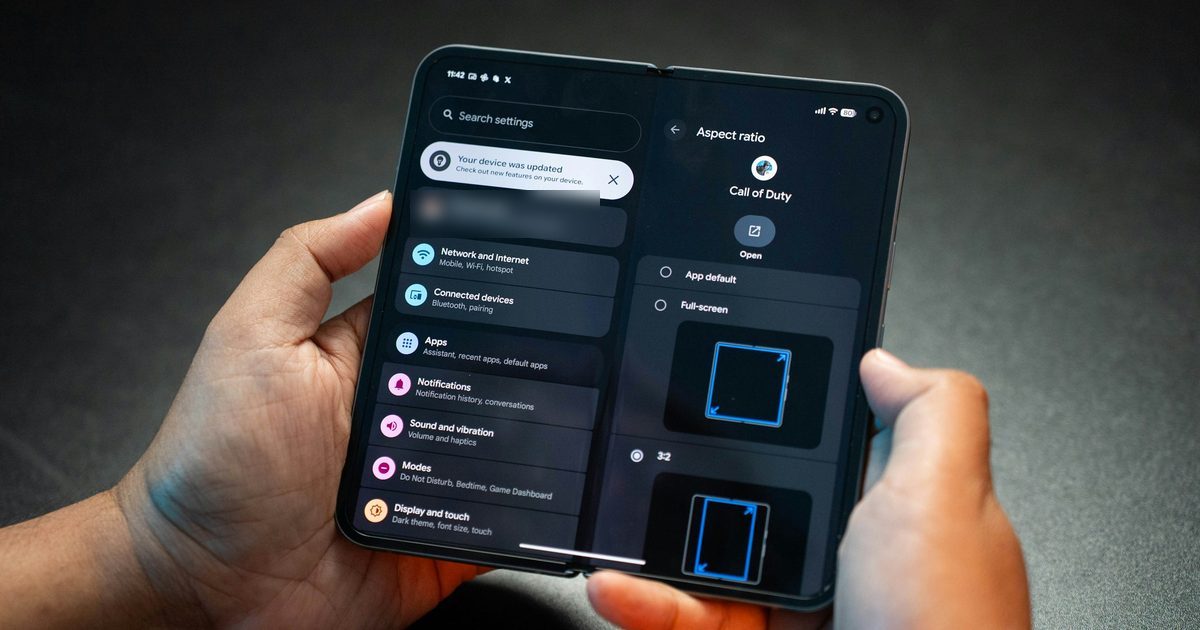
- Cover, hands holding an unfolded foldable phone: photo by Amanz on Unsplash, Unsplash License. Cropped to 1200x630, with the account name on screen blurred.
- Portrait app letterboxed on a tablet and a foldable: from Device compatibility mode in the Android Developers documentation. Image: Google, CC BY 2.5.
- Foldable screenshot shapes diagram: AppRanker, drawn from the sizes in Google's Android CLI screenshot guide.