- Chrome Web Store
- Extensions
- Discovery
Chrome Web Store changes in 2026: extension limits, fresher ratings and the end of the Featured badge
Chrome Web Store 2026 changes explained: per-publisher extension limits, ratings weighted to recent reviews, the Featured badge sunset and new data rules.
AppRanker team9 min read
On this page
The Chrome Web Store changed more for extension developers in the summer of 2026 than in the previous few years combined. Stricter data rules started being enforced on August 1. Three weeks later, Google announced per-publisher limits on how many extensions you can have, a rating that leans on recent reviews, and the end of the "Featured" badge.
None of these changes is dramatic on its own. Together they shift what it takes to launch a new extension and to be found once it is live. This post covers each change, what it means in practice, and a checklist to work through before your next release.
The changes at a glance
| Change | Announced | What it means for you |
|---|---|---|
| Data collection must be strictly necessary to your single purpose | July 1, enforced August 1, 2026 | Audit what you collect and drop anything your stated purpose does not need |
| Prominent disclosure, and notice when data practices change | July 1, enforced August 1, 2026 | Tell users before install, and again if you change what you collect |
| Ban on circumventing AI safeguards and on prediction-market extensions | July 1, enforced August 1, 2026 | New categories of prohibited products |
| Per-publisher extension limit, default of two slots | August 20, 2026 | Plan new launches around your slots, or request more |
| Automated checks on upload | August 20, 2026 | Installation and validity problems surface in the draft, before review |
| Ratings focus on recent reviews | August 20, 2026 | Your current version's reputation matters more than your history |
| "Featured" badge sunset | August 20, 2026 | Nominations are closed; the badge goes away later in 2026 |
The sources are two posts on the Chrome for Developers blog: the policy updates from July 1 and the review, limit and badge updates from August 20.
Extension limits: two slots by default
Every publisher account now has an extension limit, with a default of two. Google says the limit is individual to each publisher and is "based on several factors such as the quality and usage of your published extensions".
Existing publishers are protected. Every published extension stays published, and your limit is set to at least the number of extensions you had published at the time of the change. The limit bites when you want to add something new.
If you need more, you can request an increase from the developer dashboard, and Google says most requests get an immediate response.
What to do about it
- Know your number. Check your limit in the dashboard before you plan a launch, not on launch day.
- Consolidate near-duplicates. Two small extensions that do closely related jobs are often better as one well-reviewed extension with a clear single purpose. That also helps your listing's rating concentrate in one place.
- Retire what you no longer maintain. An abandoned extension collects stale reviews and policy risk. Google has not said whether unpublishing frees a slot, so check your dashboard after you do it.
- Request an increase with a reason. If you are launching a genuinely separate product, ask. Google has said most requests are answered immediately.
Faster feedback on uploads, and review times back to normal
Google cited a jump in submission volume as the reason reviews had slowed, and says review levels are now back to "expected baselines".
The more useful change for day-to-day work is that automated checks now run as soon as you upload a package to a draft. Installation and validity issues show up immediately, instead of after a review cycle.
In practice: upload your package to the draft as early as you can, even before the listing text and screenshots are final. If the checks flag a problem, you have lost minutes rather than days.
Ratings now lean on recent reviews
Google says the extension rating "will focus on more recent reviews to better reflect current user sentiments". The exact weighting is not published, but the direction is clear: a long-lived extension can no longer coast on reviews from years ago, and a newer one that fixes its early problems can recover faster.
That changes how to think about reviews:
- A bad release now shows up faster. A regression that triggers a wave of one-star reviews will weigh more heavily than it used to. Staged rollouts and a quick fix matter more.
- A good fix also shows up faster. If you ship a fix for a common complaint, reply to the reviews that raised it. Users who see the reply and update may revise their review.
- Do not buy or incentivize reviews. The store's spam and abuse policy prohibits "inflating product ratings, reviews, or install counts by illegitimate means, such as fraudulent or incentivized downloads, reviews and ratings". A plain, well-timed request for feedback inside your extension is fine; a reward for a five-star review is not.
The Featured badge is going away
The "Featured" badge program is being sunset later in 2026. Self-nominations closed on the day of the announcement, and all pending nominations were closed with them.
For some small publishers, that badge was the one signal of quality they could work towards. With it gone, the store's remaining signals carry more weight. According to Google's discovery documentation:
- Search ranks results using the metadata on your listing page, so the name, summary and description matter.
- Ranking in lists considers user ratings and usage, such as the number of downloads compared with uninstalls over time.
- Editorial picks on the home page are chosen by Chrome editors for performance, design, usefulness, relevancy and breadth of appeal, and cannot be bought.
- The Established publisher badge is granted automatically when the publisher's identity is verified and it has a consistent positive track record with Google services and compliance with the Developer Program Policy.
The Established publisher badge is now the badge worth aiming for. Verify your publisher identity if you have not, and keep a clean policy record.
For the listing itself, our guide to writing a store listing that converts walks through the name, icon, description and screenshots, which are exactly the fields search reads.
The August 1 data rules
The policy changes enforced since August 1, 2026 matter more than the badge, because breaking them can get an extension taken down. Four changed:
- Limited Use. User data an extension collects must be strictly necessary to its disclosed single purpose. The Limited Use policy also says collecting web browsing activity is prohibited except where a user-facing feature described prominently on the listing requires it.
- Disclosure. You must prominently disclose what you collect and get affirmative consent, and if your data practices change after install, the disclosure requirements say you must prominently disclose the change.
- Malicious and prohibited products. Extensions designed to circumvent AI safety guardrails, usage restrictions or protective measures are not allowed.
- Regulated goods and services. Extensions that facilitate real-money transactions on predictive outcomes, meaning prediction markets, are not allowed.
Your single purpose is written down in the dashboard. Everything you collect is measured against it.
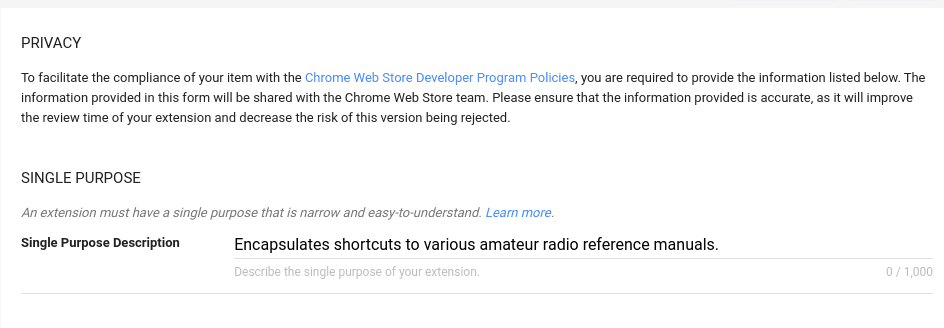
The single purpose field in the developer dashboard. Under the Limited Use policy, anything you collect has to be necessary for this sentence. Image: Google, CC BY 4.0
The data usage form is where you certify what you collect, and it is shown publicly on your listing.
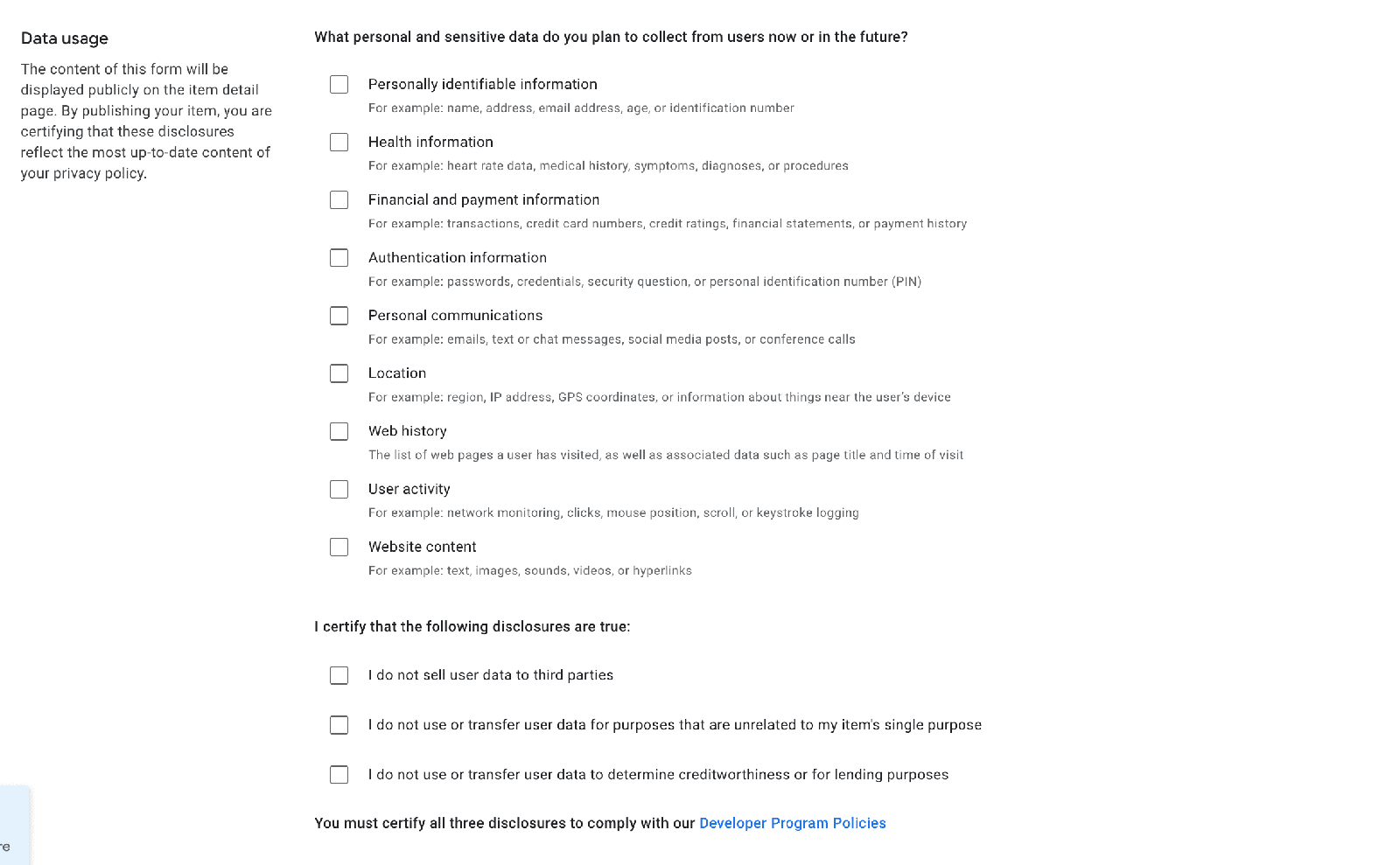
The data usage certification. Its answers appear on your public listing, so they need to match what the code does. Image: Google, CC BY 4.0
Collect less by asking later
One practical way to meet "strictly necessary" is to stop requesting everything up front. Manifest V3 lets you declare permissions as optional and request them when the user turns on the feature that needs them:
{
  "manifest_version": 3,
  "name": "Example Reader",
  "permissions": ["storage"],
  "optional_permissions": ["history"],
  "optional_host_permissions": ["https://*/*"]
}
// Request access only when the user enables the feature that needs it
document.querySelector('#enable-sync').addEventListener('click', async () => {
  const granted = await chrome.permissions.request({
    permissions: ['history'],
  });
  if (granted) {
    // turn the feature on
  }
});
chrome.permissions.request() has to be called from a user gesture, such as a click. The result is an install prompt with fewer warnings, a clearer story for reviewers, and data collection that only starts when the user asks for it.
A checklist before your next release
Account
- Check your extension limit in the dashboard, and request an increase before a planned launch.
- Verify your publisher identity, the first condition of the Established publisher badge.
- Retire or merge extensions you no longer maintain.
Data and policy
- Reread your single purpose description. Would a stranger understand it in one sentence?
- List every piece of user data the extension collects or transmits, and delete anything that sentence does not need.
- Move permissions you only need for some features to
optional_permissionsoroptional_host_permissions. - Make sure the data usage form, the privacy policy and the code all say the same thing.
- If a release changes what you collect, show users a prominent notice about it, not just a changelog line.
- Check that nothing in the extension helps users get around an AI product's safeguards or usage limits.
Release
- Upload the package to your draft early and fix anything the automated checks flag.
- Use staged rollout for risky releases, since a bad version now shows in your rating sooner.
- Reply to reviews that describe bugs you have fixed.
What this means for getting discovered
With the Featured badge going away and ratings leaning on recent reviews, discovery inside the Chrome Web Store rests more than ever on the basics: a clear listing, a good current version and a clean policy record. It also makes discovery outside the store more important, because a new extension starts with no recent reviews at all.
That is the gap a launch plan fills. Our launch-week visibility checklist covers lining up links, communities and placements around the store page. A paid position on AppRanker is one of those placements: the board lists Chrome Web Store extensions alongside Edge, Firefox and mobile apps, and what a paid position buys is spelled out, including what it does not. To see today's price for your extension, paste its store link on the home page.
FAQ
How many extensions can I publish on the Chrome Web Store now?
Each publisher has an individual limit, with a default of two slots. Existing publishers keep everything already published, and their limit is at least their published count. You can request an increase from the developer dashboard.
Will my existing extensions be removed because of the limit?
No. Google says all published extensions stay published. The limit only affects adding new ones.
Does the Featured badge still matter?
It is being sunset later in 2026, and nominations are closed. Focus on the Established publisher badge, your listing metadata and your recent ratings instead.
When did the new Chrome Web Store data rules take effect?
They were announced on July 1, 2026, and enforcement began on August 1, 2026. Extensions found out of compliance after that date may face enforcement action.
Can I ask users to leave a review?
Yes, a neutral request is fine. Offering anything in return for a review, or trying to inflate ratings by other illegitimate means, breaks the store's spam and abuse policy.
Image credits
- Cover, Chrome Web Store home page: from the Chrome Web Store discovery documentation. Image: Google, CC BY 4.0. Cropped to 1200x630.
- Single purpose field: from Fill out the privacy fields. Image: Google, CC BY 4.0.
- Data usage certification: from Fill out the privacy fields. Image: Google, CC BY 4.0. Resized to 1600px wide.