- Monetization
- Subscriptions
- App Store
- Google Play
Subscription price increase: App Store and Google Play rules
How a subscription price increase works on the App Store and Google Play: consent and opt-out rules, notice periods, the code to handle it and a low-churn plan.
AppRanker team11 min read
On this page
A subscription price increase is one of the few changes that can lift revenue overnight, and one of the few that can quietly cancel subscribers you will never hear from again. On both stores, Apple and Google, not you, tell your subscribers about the new price, and on both stores a subscriber who has to opt in and does nothing is gone. The rules decide who has to say yes, how much warning they get and what your app has to do about it.
This guide sets out the App Store and Google Play rules side by side, from Apple's App Store Connect Help and Google's Change subscription prices guide. It then covers the code that keeps your app and server in step (StoreKit messages, App Store Server Notifications, Play's real-time notifications) and a rollout plan that keeps churn low.
Key takeaways
- On both stores you can keep existing subscribers on their old price and charge the new one only to new subscribers. That is the safest first move.
- Apple asks for consent only for large or repeated increases (over 50% and about US$5 per period, or US$50 a year for annual plans; or a second increase within 12 months) or where local law requires it. Otherwise subscribers just get notice.
- Google Play increases are opt-in by default: subscribers who don't accept are cancelled. Opt-out increases exist only in some countries, with limits, and require an in-app notice.
- Notice runs from 7 to 60 days depending on store and plan length, so a price change takes a month or two to reach everyone.
- Handle
PRICE_INCREASEnotifications from Apple andSUBSCRIPTION_PRICE_CHANGE_UPDATEDfrom Google, and give subscribers a reason to stay before the store asks them.
Two decisions before you change a price
Every price change on either store comes down to two choices.
1. Who pays the new price? You can raise the price for new subscribers only and leave everyone else where they are, or move existing subscribers too. Apple says you "can keep an unlimited number of active subscribers at their existing price while increasing the price for new subscribers." Google does this by default: existing subscribers are "placed into a legacy price cohort where they continue to pay their original base plan price."
2. If existing subscribers move, do they have to agree? This is where the stores differ, and where the risk is. An increase that needs consent loses everyone who ignores the notice. An increase that only needs notice keeps them, unless they cancel.

Raising the price for new subscribers only carries no consent risk at all. Photo: Marcus / Pexels
App Store subscription price increase rules
When Apple asks subscribers to consent
Apple requires consent if any of these is true:
- The subscriber is "located in a region that requires consent for any price changes."
- The increase is "more than 50% of the current price and the difference in price exceeds approximately US$5 per period for non-annual subscriptions, or US$50 per year for annual subscriptions." Per-storefront thresholds are listed in App Store Connect.
- The subscriber "experienced a price increase for that subscription within the past 12 months."
Otherwise the increase is notice-only. Apple's own summary on its subscriptions page: "smaller, infrequent price increases can result in notifications without the need to opt in."
If consent is needed and the subscriber does nothing, Apple keeps asking "approximately weekly through email, push notifications, and in-app messaging until their subscription expires at the end of their current billing cycle."
How much notice Apple gives
| Plan length | First notification before renewal |
|---|---|
| Weekly | 7 days |
| Monthly | 27 days |
| 2, 3 and 6 months, and annual | 60 days |
Notices go out by email, push and, on iOS 13.4 or later, an in-app message. If you schedule a change inside the minimum window (7 days for weekly, 27 for monthly, 30 for longer plans), subscribers "will renew at their existing price for one more billing period."
Other App Store rules that catch people out
- One scheduled change at a time per country or region and billing plan type. Scheduling a second one overwrites the first.
- Decreases are final. Existing subscribers automatically renew at a lower price, you cannot keep them on the higher one, and "once a price decrease goes into effect, it can't be reversed."
- Move old cohorts closest-first. If you have subscribers at $1.99, $2.99 and $3.99, Apple suggests raising those "paying closest to the current price first," so nobody gets two increases in a row.
For scheduling prices by storefront, see our App Store price tiers guide.
Google Play subscription price increase rules
Opt-in increases (the default)
On Google Play, subscribers "must explicitly accept the higher price before it is first charged, or Google Play automatically cancels their subscription." The timeline:
- When you end a legacy price cohort, the new price applies at the first payment after a 37-day advance period.
- For the first seven days, Play sends nothing, and you can cancel the change by setting the price back.
- Play then notifies subscribers by email and push, starting 30 days before the charge.
- A subscriber who does not accept is "automatically canceled and expired on that renewal date."
Opt-out increases
Opt-out increases charge the new price unless the subscriber cancels or changes plans. Google says they "are only available in certain locations with limits on the increase amount and frequency, and are subject to certain developer requirements." Play Console shows which regions qualify; Google's eligibility list gives 30 days of notice for most of them and 60 days in South Africa and Zimbabwe. Unlike opt-in, there is no seven-day quiet period, and your app must show its own notice "on all device types where the app is available," with watches the only exception.
Other Google Play rules
- Installment plans change price only at the end of the commitment period.
- One change at a time. A new migration cancels an earlier one still in progress, and subscribers only have to agree to the latest.
- Regions use the parent code. When you migrate prices through the API, Google says to use "the parent region's code (e.g., US for United States)."
- Decreases reach subscribers at their next payment, with an email from Play.
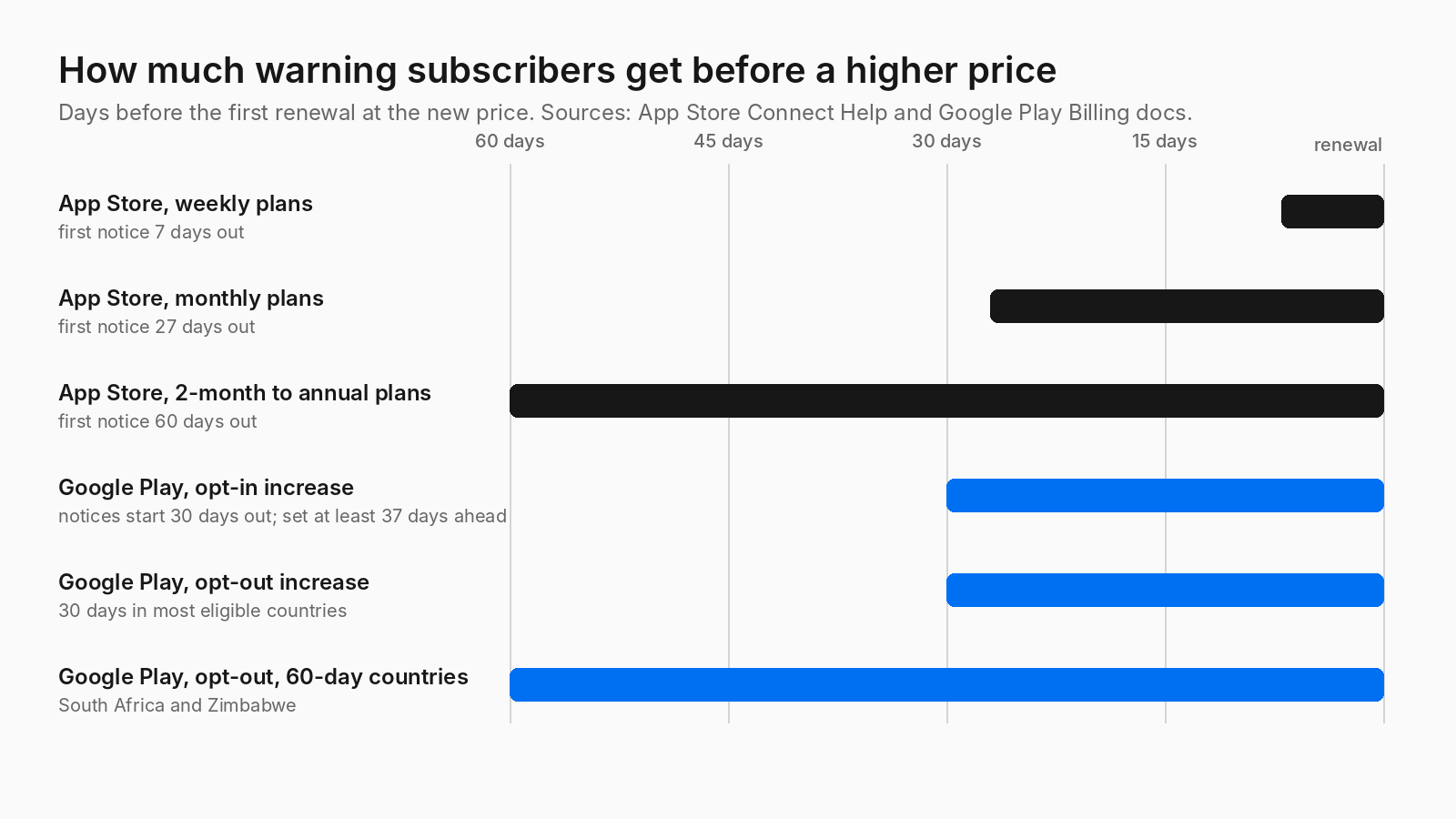
How far ahead each store starts warning subscribers. Plan your timeline from the longest window you will hit.
App Store and Google Play compared
| App Store | Google Play | |
|---|---|---|
| Keep existing subscribers on old price | Yes, optional | Yes, the default (legacy cohorts) |
| Consent needed | Only above thresholds, for repeat increases, or where law requires | Always, unless you use an eligible opt-out increase |
| No response to a consent request | Subscription expires at the end of the current period | Subscription cancels on the renewal date |
| First notice | 7, 27 or 60 days by plan length | 30 days (opt-in); 30 or 60 days (opt-out) |
| Your app must show a notice | No, Apple shows the sheet | Only for opt-out increases |
| Server signal | PRICE_INCREASE (subtypes PENDING, ACCEPTED), EXPIRED with PRICE_INCREASE |
SUBSCRIPTION_PRICE_CHANGE_UPDATED (type 19) |
Handle a price increase in your app and on your server
iOS: time the consent sheet
StoreKit shows App Store messages, including the price consent sheet, when your app launches. Apps built for iOS 16 or later can listen for them and choose the moment. Apple's Message documentation notes that if you listen and never call display(in:), the message is suppressed, so always show it eventually:
import StoreKit

@MainActor
final class StoreMessages {
    private var pending: [Message] = []

    func start() {
        Task {
            for await message in Message.messages {
                if message.reason == .priceIncreaseConsent {
                    pending.append(message)   // show after onboarding or checkout
                } else if let scene = activeScene() {
                    try? message.display(in: scene)
                }
            }
        }
    }

    // Call when the user reaches a calm screen, such as the home screen.
    func showDeferred() {
        guard let scene = activeScene() else { return }
        for message in pending { try? message.display(in: scene) }
        pending.removeAll()
    }

    private func activeScene() -> UIWindowScene? {
        UIApplication.shared.connectedScenes
            .first { $0.activationState == .foregroundActive } as? UIWindowScene
    }
}
Apple's guidance allows you to show your own screen explaining what the subscriber gets before the sheet appears. On device, Product.SubscriptionInfo.RenewalInfo.priceIncreaseStatus tells you whether a consent-required increase is pending or agreed.
Android: show Play's in-app message
For opt-in increases, Google says Play's in-app message "is shown starting on the first day the user can accept the price increase," at most "once every 7 days," and recommends adding your own notice with a deep link to the Play subscription screen:
val params = InAppMessageParams.newBuilder()
    .addInAppMessageCategoryToShow(InAppMessageParams.InAppMessageCategoryId.TRANSACTIONAL)
    .build()

billingClient.showInAppMessages(activity, params) { result ->
    // Refresh entitlements from your server when the user acts on a message
}

// Your own notice can open the subscription page in Play
val url = "https://play.google.com/store/account/subscriptions?sku=$productId&package=$packageName"
Server: record who accepted, who left
Apple sends PRICE_INCREASE with subtype PENDING when a subscriber has been asked and has not answered, PRICE_INCREASE with ACCEPTED when they consent (or are notified of an increase that needs no consent), and EXPIRED with subtype PRICE_INCREASE when the subscription ends because they never consented (notification types). Google sends SUBSCRIPTION_PRICE_CHANGE_UPDATED (type 19); the details are on the purchase in autoRenewingPlan.priceChangeDetails, with priceChangeMode (PRICE_INCREASE, OPT_OUT_PRICE_INCREASE or PRICE_DECREASE) and priceChangeState (OUTSTANDING, CONFIRMED, APPLIED or CANCELED) (subscriptionsv2).
A Node.js sketch that turns both into one record per subscriber:
import { google } from 'googleapis';

const publisher = google.androidpublisher({
  version: 'v3',
  auth: new google.auth.GoogleAuth({
    scopes: ['https://www.googleapis.com/auth/androidpublisher'],
  }),
});

// Google: Pub/Sub push body for real-time developer notifications
export async function onPlayNotification(body) {
  const n = JSON.parse(Buffer.from(body.message.data, 'base64').toString('utf8'));
  const sub = n.subscriptionNotification;
  if (sub?.notificationType !== 19) return; // SUBSCRIPTION_PRICE_CHANGE_UPDATED

  const { data } = await publisher.purchases.subscriptionsv2.get({
    packageName: n.packageName,
    token: sub.purchaseToken,
  });
  for (const item of data.lineItems ?? []) {
    const change = item.autoRenewingPlan?.priceChangeDetails;
    if (!change) continue;
    await savePriceChange({
      store: 'play',
      subscriber: sub.purchaseToken,
      product: item.productId,
      state: change.priceChangeState,       // OUTSTANDING, CONFIRMED, APPLIED, CANCELED
      mode: change.priceChangeMode,
      effectiveAt: change.expectedNewPriceChargeTime,
    });
  }
}

// Apple: payload already verified and decoded, for example with
// SignedDataVerifier from @apple/app-store-server-library
export async function onAppStoreNotification(payload, transaction) {
  const key = `${payload.notificationType}:${payload.subtype ?? ''}`;
  const state = {
    'PRICE_INCREASE:PENDING': 'OUTSTANDING',
    'PRICE_INCREASE:ACCEPTED': 'CONFIRMED',
    'EXPIRED:PRICE_INCREASE': 'LOST',
    'DID_CHANGE_RENEWAL_STATUS:AUTO_RENEW_DISABLED': 'CANCELED_RENEWAL',
  }[key];
  if (!state) return;
  await savePriceChange({
    store: 'appstore',
    subscriber: transaction.originalTransactionId,
    product: transaction.productId,
    state,
  });
}
savePriceChange is your own storage. With both stores in one table, you can count acceptances, cancellations and expiries per cohort while the change rolls out.
Every subscriber who has to opt in makes a fresh purchase decision. Photo: Thirdman / Pexels
A rollout plan that keeps churn low
- Raise the price for new subscribers first. Leave existing subscribers on their price for a few weeks, and watch trial starts and conversion at the new price before you touch anyone who already pays.
- Stay under Apple's consent threshold where you can. A notice-only increase keeps silent subscribers; a consent increase loses them. On Google Play, check whether your regions allow opt-out increases.
- Ship the reason before the notice. Release the features that justify the price, then tell subscribers in the app before the store's email arrives. Nobody likes learning about a price change from a receipt.
- Move one cohort at a time, closest price first, and never stack a price change with other subscription changes.
- Watch the server events, not just revenue:
PENDINGandOUTSTANDINGcounts tell you how many people still have to decide. - Catch the ones who leave. Apple's win-back offers target lapsed subscribers, and a billing grace period keeps failed renewals from turning into churn during the same window.
Subscription price increase checklist
- Decide: new subscribers only, or existing subscribers too
- Check each increase against Apple's consent thresholds and the 12-month rule
- Check which Google Play regions allow opt-out increases, and plan the in-app notice
- Schedule one change at a time, cohorts closest to the new price first
- Defer the iOS consent sheet away from onboarding and checkout, but always show it
- Show Play's in-app message and your own notice with a link to the Play subscription page
- Store
PRICE_INCREASEandSUBSCRIPTION_PRICE_CHANGE_UPDATEDevents per subscriber - Have win-back and grace period settings ready before the first renewal at the new price
Spend the extra revenue on growth
Higher revenue per subscriber raises what you can afford to pay for each new one; our guide to cost per install shows how to work out that ceiling. One option is a fixed, visible placement: AppRanker is a pay-to-rank leaderboard for App Store and Google Play apps where every row links straight to your store page, and you can check what a position costs by pasting your store link.
FAQ
Can I raise my subscription price for existing subscribers?
Yes, on both stores. You can also keep existing subscribers on their current price and charge only new subscribers. On the App Store, large or repeated increases need consent; on Google Play, increases need consent unless you use an eligible opt-out increase.
What happens if a subscriber doesn't accept the price increase?
On the App Store, the subscription expires at the end of the current billing period after Apple's weekly reminders. On Google Play, the subscription is cancelled and expires on the renewal date when the new price would have applied.
How much notice do subscribers get?
Apple starts notifying 7 days before renewal for weekly plans, 27 days for monthly plans and 60 days for 2-month to annual plans. Google Play starts 30 days before the charge for opt-in increases, and 30 or 60 days for opt-out increases, depending on the country.
Does Apple require consent for every subscription price increase?
No. Consent is required only where local law requires it, when the increase is over 50% and more than about US$5 per period (US$50 per year for annual plans), or when the subscriber already had an increase in the past 12 months.
What is an opt-out price increase on Google Play?
An increase that charges subscribers the new price unless they cancel or change plans. It is only available in certain countries, with limits on amount and frequency, and your app must show its own notice about the change.
Can I undo a subscription price change?
On Google Play, you can cancel an opt-in increase within the first seven days by setting the price back, before any notices go out. On the App Store, a scheduled change can be replaced before it starts, but a price decrease cannot be reversed once it is in effect.
Image credits
- Cover, calculating on a phone next to dollar bills and a notepad: photo by Kaboompics.com on Pexels, Pexels License. Cropped to 1200x630.
- Hanging price tag: photo by Marcus on Pexels, Pexels License. Cropped to landscape and resized.
- Holding a payment card and a phone: photo by Thirdman on Pexels, Pexels License. Cropped.
- Notice period chart: AppRanker, from Apple's App Store Connect Help and Google's Play Billing documentation.